

Most corporate training managers have sat through a video that looked polished but taught almost nothing. Slides, a monotone voice-over, a company logo in the corner — and employees who checked out by minute three. The real problem isn’t production quality alone. It’s the absence of strategy, learning science, and instructional intent. Effective educational video production is an entirely different discipline from filming a presentation or recording a talking head. This guide breaks down exactly what separates a video that changes behavior from one that simply fills time, giving you a clear, actionable framework for every stage of the process.
Table of Contents
- Defining educational video production: Beyond the basics
- Phases of educational video production: From concept to delivery
- Evidence-based design: Applying cognitive science to boost retention
- Common pitfalls and mistakes in educational video production
- Why the difference between ‘informative’ and ‘educational’ videos matters more than you think
- Elevate your organization’s learning with expert video production
- Frequently asked questions
Key Takeaways
| Point | Details |
|---|---|
| Strategic design matters | Effective educational videos require intentional planning, not just recording and editing. |
| Apply multimedia principles | Following evidence-based design like Mayer’s principles boosts engagement and learning retention. |
| Avoid common mistakes | Technical missteps and cognitive overload quickly undermine even well-produced videos. |
| Distinct from general videos | Educational video production specifically targets learning and measurable employee growth. |
Defining educational video production: Beyond the basics
Educational video production is a strategic process designed to teach, train, or upskill employees through audiovisual content. The keyword here is strategic. Unlike a promotional brand video or a general corporate announcement, an educational video is built around a defined learning outcome. Every creative decision, from the pacing to the graphics to the script structure, serves that outcome.
This distinction matters enormously for training and development managers. When you commission video production types for your learning program, you’re not just buying filmed content. You’re investing in a tool that should measurably shift knowledge, skills, or behavior in your workforce. A general corporate video might inform or inspire. An educational video must teach.
What makes an educational video stand apart comes down to a few core qualities:
- Clear learning objectives defined before a single frame is filmed
- Audience-specific scripting that matches the learner’s prior knowledge and context
- Deliberate pacing that allows time for comprehension, not just information delivery
- Visual design that reinforces the message rather than decorating it
- Assessment alignment, meaning the video prepares learners for what they’ll be tested on or asked to apply
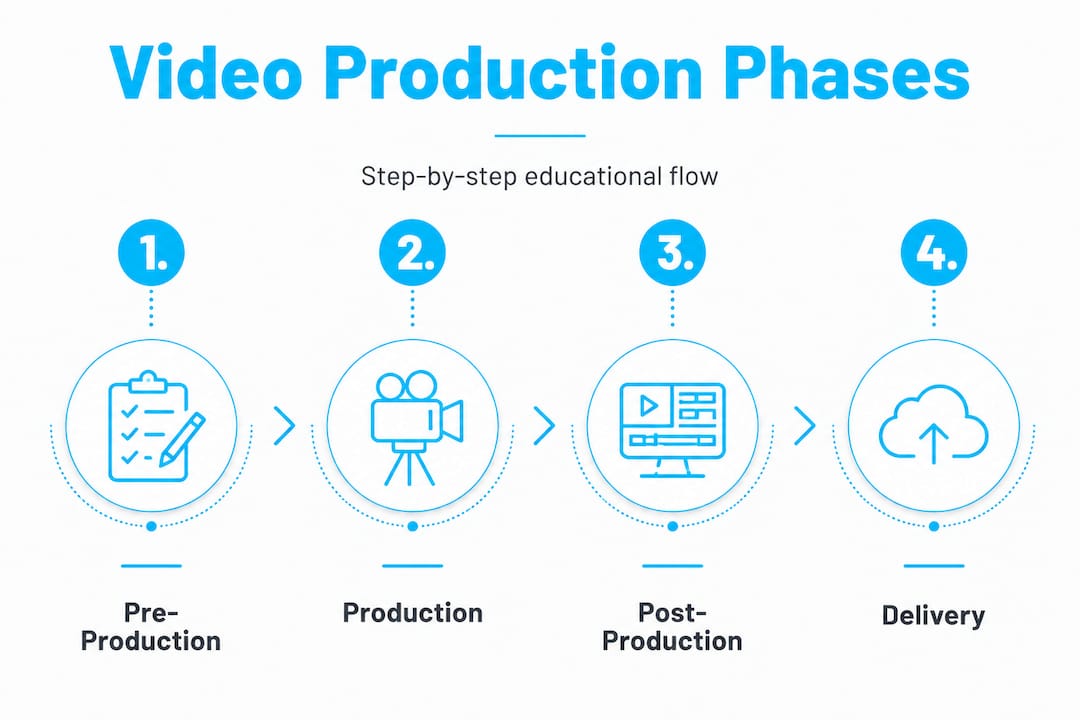
As the Producing Engaging Educational Videos framework notes, the standard workflow consists of three production phases: pre-production, production, and post-production. Each phase carries specific responsibilities that distinguish an educational video from a generic one. Many organizations treat video production as a one-phase exercise — point, shoot, export. That shortcut is exactly why so many training videos fail.
“A high-quality educational video isn’t measured by how good it looks. It’s measured by how much learners retain and apply after watching it.” That distinction shapes every decision from concept to delivery.
You can also explore how YouTube video production principles translate into structured learning formats that hold attention well beyond the typical corporate attention span.
Phases of educational video production: From concept to delivery
Understanding the structured phases that turn a concept into a compelling educational asset is critical before you brief any production team. The workflow isn’t linear by accident. Each stage builds on the one before, and skipping steps creates compounding problems downstream.
Here’s how each phase breaks down in practice:
-
Pre-production: Set the foundation. This phase covers goal setting, audience analysis, and scripting. You should define the learning objective in measurable terms (not “understand compliance” but “correctly identify three reportable workplace incidents”). Audience analysis shapes vocabulary, context, and assumed knowledge level. Scripting converts expertise into a structured, learner-centered narrative. Storyboarding maps visuals to spoken content before anything is recorded.
-
Production: Capture with intention. This is where narration, live-action footage, screen recordings, and supporting visuals come together. Technical quality — lighting, audio clarity, camera stability — is non-negotiable here. A single audio problem can break viewer concentration and undermine retention, no matter how well-written the script is.
-
Post-production: Engineer the learning experience. Editing is where pacing is controlled, graphics are added, captions are embedded, and the content is stress-tested against learning objectives. Quality assurance (QA) at this stage should include actual learners reviewing the video, not just internal stakeholders.
The full service production process reflects this phased approach, ensuring that every decision at each stage remains anchored to the educational goal rather than just the aesthetic result.
Here’s a direct comparison of how educational and generic corporate videos differ across key dimensions:
| Dimension | Educational video | Generic corporate video |
|---|---|---|
| Primary goal | Behavior or skill change | Inform or promote |
| Script structure | Learning-objective driven | Message or story driven |
| Audience targeting | Role-specific, prior knowledge considered | Broad or internal audience |
| Pacing | Deliberate, chunked for retention | Driven by runtime or format |
| Outcome measurement | Pre/post assessment, performance data | Views, completion rates |
| Visual design | Reinforces concepts and reduces load | Brand alignment and aesthetics |
Pro Tip: Involve subject-matter experts early in the pre-production phase, specifically during scripting and storyboarding, before production begins. Their input prevents costly reshoots and ensures accuracy that production teams alone can’t guarantee.
Evidence-based design: Applying cognitive science to boost retention
Once you understand the process, the next level is engineering your videos for how adults actually learn best in a corporate environment. This is where cognitive science stops being theoretical and starts directly improving your training ROI.
The most influential framework in educational video design is Mayer’s multimedia learning principles. These principles are grounded in decades of research on how the human brain processes visual and auditory information simultaneously. Understanding them gives you a practical filter for every content and design decision. According to eLearning multimedia research, the core principles work as follows:
| Principle | Definition | Application in corporate training |
|---|---|---|
| Modality | Graphics + narration outperform text + graphics | Use voice-over with visuals instead of bullet-heavy slides |
| Segmenting | Break content into bite-sized chunks | Limit modules to 5 to 8 minutes max |
| Signaling | Highlight key points visually | Use arrows, callouts, or color emphasis on critical concepts |
| Coherence | Remove extraneous content | Cut every element that doesn’t serve the learning objective |
| Multimedia | Words + pictures together beat words alone | Pair every key point with a relevant graphic or animation |
One of the most common violations of these principles is redundancy. Displaying the same text on screen that your narrator is reading aloud overloads working memory and actually reduces learning, according to cognitive load research. Learners end up reading and listening simultaneously, splitting their limited attention rather than focusing it.
Playback speed is another factor that catches many managers off guard. Research shows that accelerated playback above 1.25x significantly increases cognitive load (effect size g=.59) and reduces retention. This finding matters if your LMS platform allows learners to speed up videos at will. Designing content that still works at 1.25x is a smart production goal, but you should set expectations with learners that faster isn’t smarter.
Effective corporate ethics videos demonstrate how these principles apply in sensitive, high-stakes training contexts where comprehension and behavioral follow-through matter most.
Here are the practical do’s and don’ts for applying cognitive science directly to your training video production:
Do:
- Pair narration with supporting visuals, not text repetition
- Divide complex topics into short, focused segments with clear transitions
- Signal importance with visual cues like highlights, labels, or zooms
- Give learners a moment of silence or a pause screen after key concepts
- Test your pacing with real employees before full deployment
Don’t:
- Read slides aloud while displaying the full text on screen
- Pack multiple learning objectives into a single unbroken video
- Add background music that competes with the narration for attention
- Assume faster is better — research on video learning performance consistently shows pacing matters
- Use decorative animations that don’t reinforce the learning content
Common pitfalls and mistakes in educational video production
Even with sound design principles, small missteps can undermine your investment. Here’s what to watch for as you produce videos.
The most damaging mistakes aren’t always the most obvious ones. Poor audio is the single fastest way to lose a learner. Studies and production experience both confirm the same finding: viewers will tolerate imperfect video quality far longer than they’ll tolerate bad audio. Hissing, echo, inconsistent volume, and background noise all signal unprofessionalism and break concentration. Investing in quality audio capture during production pays dividends that no amount of post-production polish can fully recover.
Here are the most common pitfalls we see in corporate training video production, along with their remedies:
-
Poor audio and lighting. Solution: Record in a controlled environment with a dedicated microphone. Use three-point lighting as a baseline standard, even for simple narration shoots.
-
Redundant information (on-screen text + narration). Solution: Choose one channel per concept. If you narrate it, show a supporting image. If you display text, let learners read without simultaneous narration.
-
Too much information in a single module. Solution: Follow the segmenting principle. One concept, one video. Build a library of short modules instead of a single exhaustive course.
-
No clear pacing or breathing room. Solution: Build in visual pauses, chapter markers, and summary slides at natural breakpoints. Treat silence as a teaching tool, not dead air.
-
Skipping learner QA before rollout. Solution: Test with a representative sample of actual employees, not just your production team or subject-matter experts. Real learners surface problems you’ll never anticipate internally.
-
Neglecting captions and accessibility. Solution: Embed accurate captions in every video. Beyond accessibility compliance, captions improve comprehension for all learners, particularly in noisy environments or for non-native speakers.
Research confirms what experienced producers already know: cognitive overload effects from poor production decisions, including accelerated playback, redundancy, and cluttered visuals, reliably reduce retention even when the underlying content is excellent. Technical quality and instructional design are inseparable.
Reviewing training video best practices before entering production gives your team a practical checklist to avoid these issues systematically rather than discovering them during post-production.
Pro Tip: Run a structured QA round with five to ten employees from your target learner group before any organization-wide rollout. Ask them what they retained, what confused them, and what they’d skip. Their answers will tell you more than any internal review session.
Why the difference between ‘informative’ and ‘educational’ videos matters more than you think
After reviewing common mistakes, it’s worth reflecting on one big assumption that shapes most internal video strategy. The assumption goes something like this: if a video contains accurate information and employees watch it, learning has occurred. We’d push back on that directly, because the evidence doesn’t support it.
Informative videos tell. Educational videos teach. That’s not wordplay. It’s a structural difference in intent, design, and outcome. An informative video might walk employees through a new process. An educational video builds in repetition, active retrieval cues, and assessment checkpoints that ensure employees can actually execute that process after the video ends.
We’ve seen organizations invest heavily in production value — professional shoots, polished motion graphics, executive narrators — and still see minimal change in employee behavior or knowledge retention. Why? Because the investment went entirely into aesthetics and none of it went into instructional architecture. The result is a “nice-to-have” asset that satisfies a checkbox rather than a learning tool that drives measurable performance change.
The fix isn’t to spend less on production quality. It’s to spend more intentionally, putting learning science at the center of every creative decision. This means writing scripts around cognitive load theory, not just storytelling instincts. It means structuring content around assessment goals, not just subject-matter coverage. It means measuring outcomes in performance data, not just completion rates.
Organizations that treat impactful corporate videos as a learning investment rather than a content deliverable consistently see stronger training ROI. The shift isn’t in the budget. It’s in the brief.
Elevate your organization’s learning with expert video production
Ready to go from principles to practice? The right partner can make educational video production both effective and effortless.
At Bonomotion, we’ve spent over 20 years helping organizations translate complex knowledge into video content that actually moves the needle on learning outcomes. We don’t just produce polished visuals. We build training assets grounded in instructional intent, technical precision, and your specific workforce goals. Every project is guided by an experienced producer who works with your team from the objective-setting phase through final delivery.
Whether you’re building a compliance library, onboarding program, or leadership development series, our corporate video solutions are built to integrate seamlessly with your training strategy. Explore our corporate video production capabilities to see how we approach educational content at scale. For a closer look at our full range of capabilities, our videography production services page covers the breadth of what we deliver. Connect with us to discuss how we can help your organization multiply learning ROI through strategically produced video.
Frequently asked questions
What are the three phases of educational video production?
The three core phases are pre-production, production, and post-production, each carrying specific tasks that determine whether the final video achieves its learning objective. Skipping or rushing any phase introduces compounding problems that post-production editing rarely fixes.
Which design principles are most important for training videos?
The most impactful principles, drawn from Mayer’s multimedia research, include pairing graphics with narration, segmenting content into short chunks, signaling key ideas visually, and cutting anything that doesn’t directly serve the learning objective. Applied together, these principles measurably improve retention compared to traditional slide-based video formats.
How does accelerated playback affect learning in educational videos?
Playback speeds above 1.25x are shown to increase cognitive load and reduce retention, making comprehension significantly harder even when learners feel they are saving time. If your LMS allows variable playback, communicate this finding clearly to your workforce.
What’s the main difference between an educational video and a typical corporate video?
Educational videos are built around learning objectives and evidence-based instructional design, while typical corporate videos are optimized for communication, brand presence, or informational delivery. The core difference is measurability: a well-designed educational video produces a demonstrable shift in knowledge or performance, which a general corporate video is rarely designed to achieve.