

Event video ROI is defined as the net financial return generated from event-related video content relative to its total production and distribution costs, calculated using the formula: ((Revenue Generated minus Total Investment) divided by Total Investment) multiplied by 100. For B2B event marketers and executives, this metric is the clearest signal of whether your video spend is building pipeline or burning budget. The industry term for this broader discipline is event marketing attribution, and understanding it requires more than a single revenue figure. You need engagement signals, pipeline data, and the right timing window to tell the full story.
What event video ROI explained actually means for your budget
Event video ROI explained is not simply a post-event calculation. It is a layered measurement model that combines video engagement metrics, CRM pipeline data, and attribution windows spanning 90 to 180 days to reflect the true length of B2B sales cycles. The core formula, as defined by ON24, is ROI (%) = ((Revenue Generated minus Total Investment) divided by Total Investment) x 100, with weighted pipeline value used as a revenue proxy when deals are still in progress. That proxy matters because most B2B deals close weeks or months after the event itself.

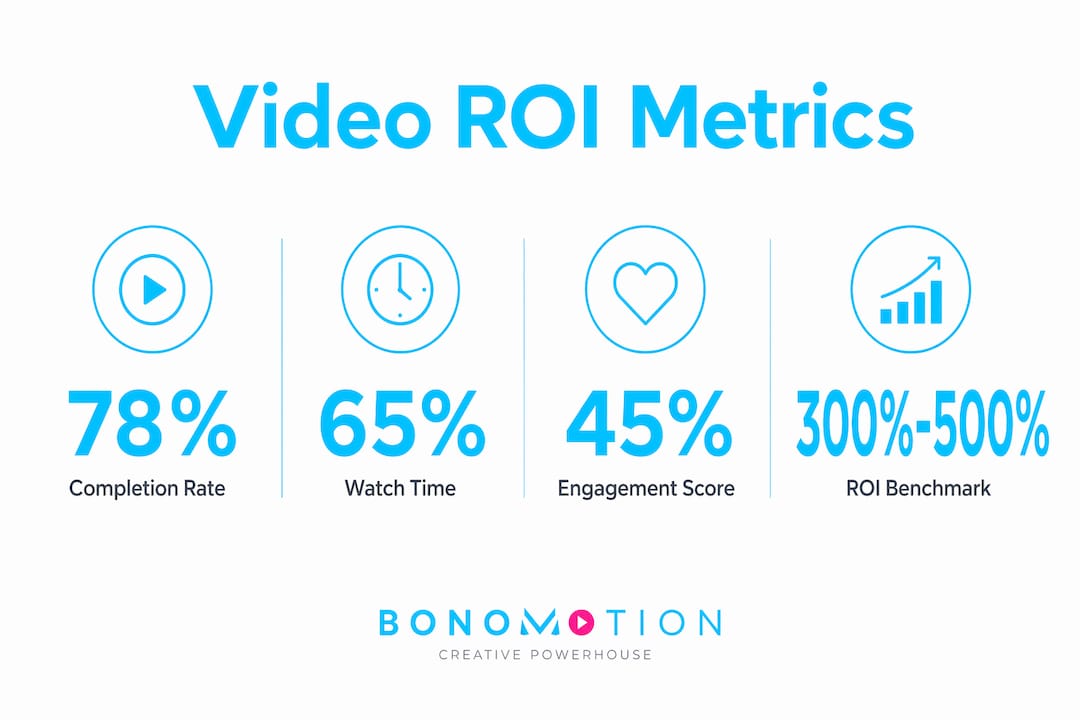
Typical B2B event ROI benchmarks range from 300% to 500%, according to Gable.to’s 2026 framework. That range is wide because deal size, sales cycle length, and event format all shift the outcome. A single-day executive roundtable in Miami with 40 C-suite attendees will produce a different ROI profile than a 3,000-person trade show, even if the production costs are similar. Knowing your benchmark context is the first step toward a credible measurement practice.
The return on investment for event videos also includes non-revenue value: brand recall, content repurposing across social and email channels, and the quality of leads generated. These are not soft metrics to be dismissed. They are leading indicators that predict downstream revenue, and they belong in every ROI report you present to a CMO or CFO.
What metrics matter most for measuring event video effectiveness
Event video metrics fall into two categories: engagement indicators and pipeline indicators. Both are required for a complete picture of event video effectiveness.
Engagement metrics tell you how your audience interacted with the content itself:
- Watch time measures total minutes consumed and signals content relevance.
- Video completion rate shows what percentage of viewers watched to the end, a direct proxy for content quality.
- Click-through rate (CTR) tracks how many viewers took a next step after watching.
- Conversion rate measures how many video viewers became leads or opportunities.
Hootsuite’s 2026 guide confirms that pairing conversion metrics with retention indicators produces the most accurate read of video performance relative to business goals. A high completion rate with a low conversion rate tells you the content is engaging but the call to action is weak. A high CTR with low watch time suggests the thumbnail or title is misleading. Each combination points to a different fix.
Pipeline indicators connect video engagement to revenue outcomes:
- Sourced pipeline tracks deals where the event video was the first meaningful touchpoint.
- Influenced pipeline tracks deals where the video played a role but was not the originating source.
- Lead quality score reflects how closely a video viewer matches your ideal customer profile.
ON24’s data shows that leads engaging with interactive video features such as polls and Q&A sessions have measurably higher downstream conversion rates. This means engagement score is not just a vanity metric. It is a predictor of pipeline success.
| Metric | Category | What it tells you |
|---|---|---|
| Video completion rate | Engagement | Content quality and audience relevance |
| Watch time | Engagement | Depth of interest in the topic |
| CTR | Engagement | Effectiveness of the call to action |
| Sourced pipeline | Pipeline | Direct revenue attribution to the event video |
| Influenced pipeline | Pipeline | Broader revenue impact across the sales cycle |
| Lead quality score | Pipeline | Likelihood of conversion based on viewer profile |
Pro Tip: Set up UTM parameters on every video link distributed post-event. Without them, your CRM will misattribute traffic and your sourced pipeline numbers will be understated from day one.
How attribution models affect the accuracy of your ROI calculations
Attribution is where most event video ROI calculations break down. The default attribution window in most CRM platforms is 14 to 30 days. For B2B sales cycles that run 90 to 180 days, that window captures only a fraction of the revenue your event video actually influenced.
Marqeu’s pipeline attribution research shows that sourced-only attribution undercounts impact by 60% to 80% in typical B2B programs. That is not a rounding error. It means a campaign that generated $500,000 in influenced pipeline could appear to have generated only $100,000 if you rely on sourced attribution alone. CFOs who see that number will cut the video budget. The real number would justify expanding it.
The two attribution models most relevant to event video are:
- Multi-touch attribution distributes credit across every touchpoint in the buyer journey, from the first video view to the final sales call. This model rewards content that assists conversions rather than just closing them.
- W-shaped attribution assigns heavier credit to three key moments: first touch, lead creation, and opportunity creation. For event videos that generate net-new leads, this model often produces the most defensible ROI figure for executive audiences.
Lensmor recommends a structured reporting cadence: pull interim reports at 30 and 90 days, then close the measurement period with a final report at 180 days. The 30-day report captures immediate engagement and early pipeline signals. The 90-day report shows conversion momentum. The 180-day report reflects actual closed revenue tied to the event. Running all three gives you a narrative arc, not just a snapshot.
Short attribution windows do not just underreport ROI. They actively distort your investment decisions by making high-performing event video programs look like failures before the revenue has had time to materialize.
How to connect event video data to your CRM for credible reporting
Credible ROI measurement requires three data sources working together: your video platform, your marketing automation platform (MAP), and your CRM. Without all three connected, you are measuring parts of the picture, not the whole.
The data architecture starts with a formal video event taxonomy. RudderStack’s video events specification defines structured behavioral tracking events including playback start, pause, completion, and dropped frames. Implementing this taxonomy early means you can troubleshoot engagement drop-off points and tie specific content segments to conversion outcomes. Most teams skip this step and end up with raw view counts that tell them nothing actionable.
From the MAP, you need contact-to-account mapping that links individual video viewers to their company records in the CRM. Without this, a VP of Procurement watching your event recap video appears as an anonymous lead rather than a high-value contact at a target account. Salesforce users can use campaign hierarchy structures to roll up individual event video touchpoints into a parent campaign, giving you a single ROI view across a multi-day conference or a series of event recap videos.
Pro Tip: Before your event, create a dedicated Salesforce campaign for each video asset, not just for the event itself. This lets you measure which specific video content drove pipeline, not just which event the contact attended.
The qualitative layer matters too. Combining video engagement depth with CRM pipeline data lets you tell a CFO not just that the event generated $1.2 million in pipeline, but that 68% of that pipeline came from contacts who watched more than 75% of the keynote recap video. That specificity transforms a budget conversation.
Best practices for reporting event video ROI to stakeholders
CFOs and CMOs need different reports from the same data set. Presenting the wrong metrics to the wrong audience is one of the most common mistakes in event video ROI reporting.
A CFO-focused report should include total event video production cost, total closed revenue attributed to the event within the attribution window, total pipeline value (sourced and influenced), and the final ROI percentage. Gable.to’s 2026 framework confirms that CFO reports must center on cost, revenue, and ROI percentage to be credible at the executive level. Anything else reads as marketing spin.
A CMO-focused report should include attendance and viewership numbers, engagement metrics by video asset, lead quality scores, content repurposing reach (how many times event video clips were reused in email, social, or sales enablement), and brand sentiment indicators. Pairing engagement retention data with conversion KPIs gives CMOs the narrative they need to justify future production investment and refine content strategy.
Common mistakes in event video ROI reporting:
- Reporting ROI before the 90-day attribution window closes, which produces artificially low numbers.
- Excluding influenced pipeline from the revenue calculation, which understates total impact.
- Using a single metric (usually attendance) as a proxy for ROI without connecting it to pipeline data.
- Failing to document qualitative outcomes like key conversations, partnership discussions, or media coverage generated by event video content.
- Presenting identical reports to CFOs and CMOs instead of tailoring the metric set to each audience’s decision-making priorities.
The 30/90/180-day reporting cadence solves most of these problems by design. It forces patience, builds a data narrative over time, and gives you three distinct opportunities to demonstrate growing ROI as deals progress through the pipeline.
Key takeaways
Accurate event video ROI measurement requires a layered model combining engagement signals, pipeline attribution, and a 90 to 180-day reporting window to reflect real B2B sales cycles.
| Point | Details |
|---|---|
| Use the right formula | Apply ((Revenue minus Cost) / Cost) x 100 with weighted pipeline as a revenue proxy for in-progress deals. |
| Extend your attribution window | Default 14 to 30-day windows undercount B2B event video impact; use 90 to 180 days for accurate results. |
| Include influenced pipeline | Sourced-only attribution undercounts total impact by 60% to 80%; always report both sourced and influenced pipeline. |
| Connect video data to CRM | Implement a video event taxonomy and contact-to-account mapping before the event, not after. |
| Tailor reports by audience | CFOs need cost and revenue figures; CMOs need engagement depth and lead quality metrics. |
Why most event video ROI reports miss the point entirely
After working with event marketers and executives across hundreds of productions, I have noticed a consistent pattern: teams spend weeks planning the event video and about 48 hours thinking about how to measure it. The result is a report built around whatever data was easiest to pull, usually attendance numbers and total views, presented to a CFO who immediately asks about pipeline. The conversation stalls, the budget gets questioned, and a genuinely high-performing program gets labeled inconclusive.
The uncomfortable truth is that executives want a single ROI figure, but a single figure without context is almost always misleading. A 400% ROI calculated on a 30-day window looks worse than a 250% ROI calculated on a 180-day window, even if the first program actually outperformed the second. The number without the window is noise.
What I have seen work consistently is building the measurement architecture before the event goes live. That means setting up your Salesforce campaign hierarchy, configuring your video event taxonomy in your MAP, and agreeing on the attribution model with your revenue operations team before a single camera rolls. Teams that do this produce reports that CFOs actually trust, because the methodology is documented and defensible, not assembled retroactively.
The other overlooked factor is lead quality. I have seen events generate 500 leads with a 2% close rate and events generate 80 leads with a 35% close rate. The second event had a fraction of the raw numbers but delivered three times the revenue. Engagement score from interactive video features is one of the best early signals of which category your leads fall into. Track it from day one, and you will know within 30 days whether your event video program is building real pipeline or just filling a spreadsheet.
The teams that win at event video ROI measurement are not the ones with the most sophisticated tools. They are the ones who commit to the process before the event, stay patient through the attribution window, and present their findings in the language their executives actually use.
— Bernard
How Bonomotion helps you produce event video that earns its ROI
At Bonomotion, we have spent over 20 years producing event video content that does more than document what happened. Every production we deliver is built around your business objectives, your audience, and the metrics you need to justify the investment. From multi-day conference coverage in Miami to executive keynote packages distributed nationwide, our producers work as an extension of your team to capture content that drives engagement, generates leads, and supports the ROI reporting your stakeholders expect.
If you are ready to produce event video that connects directly to pipeline, explore our corporate video production services or reach out to discuss a production plan built around your specific ROI goals. We also offer strategic event video marketing guidance to help you plan content that performs long after the event ends.
FAQ
What is the formula for calculating event video ROI?
Event video ROI is calculated as ((Revenue Generated minus Total Investment) divided by Total Investment) multiplied by 100. ON24 recommends using weighted pipeline value as a revenue proxy when deals are still in progress at the time of reporting.
How long should I wait before reporting event video ROI?
The standard attribution window for B2B event video is 90 to 180 days. Reporting before 90 days typically undercounts revenue impact because most B2B deals have not yet closed within that timeframe.
What is the difference between sourced and influenced pipeline?
Sourced pipeline tracks deals where the event video was the first touchpoint; influenced pipeline tracks deals where the video played a role at any point in the buyer journey. Using sourced attribution alone undercounts total event video impact by 60% to 80%.
Which video metrics best predict ROI for B2B events?
Video completion rate, watch time, and interactive engagement score (from features like polls and Q&A) are the strongest leading indicators of downstream conversion and pipeline quality for B2B event video programs.
How do I present event video ROI to a CFO versus a CMO?
CFO reports should focus on total cost, closed revenue, pipeline value, and ROI percentage. CMO reports should emphasize engagement depth, lead quality scores, and content repurposing reach across channels.