

Video production is one of the most resource-intensive, coordination-heavy workflows in any organization. Missed deadlines, ballooning budgets, and disorganized asset libraries are not exceptions in video project management. They are the norm for teams without a disciplined process in place. Whether you are overseeing a single brand video or managing a multi-day conference production, knowing how to manage a video project from kickoff through final delivery is the single most valuable skill you can develop. This guide gives you a practical, structured framework built for project managers and team leaders who need results, not theory.
Table of Contents
- Key Takeaways
- How to manage a video project from day one
- Organizing and managing video assets
- Executing the production phase
- Managing post-production and final delivery
- My honest perspective on what actually works
- How Bonomotion can manage your next video project
- FAQ
Key Takeaways
| Point | Details |
|---|---|
| Plan before you produce | Establish clear goals, defined scope, and a realistic budget with a contingency fund before any camera rolls. |
| Centralize your assets | Use a Digital Asset Management system with metadata standards to keep video files organized and accessible at scale. |
| Communicate relentlessly | Daily check-ins and project dashboards prevent the miscommunication that causes costly production delays. |
| Structure post-production | Logical folder naming, version control, and a structured review process eliminate bottlenecks in the editing phase. |
| Measure what matters | Track project success with delivery metrics and distribution data to improve your next production cycle. |
How to manage a video project from day one
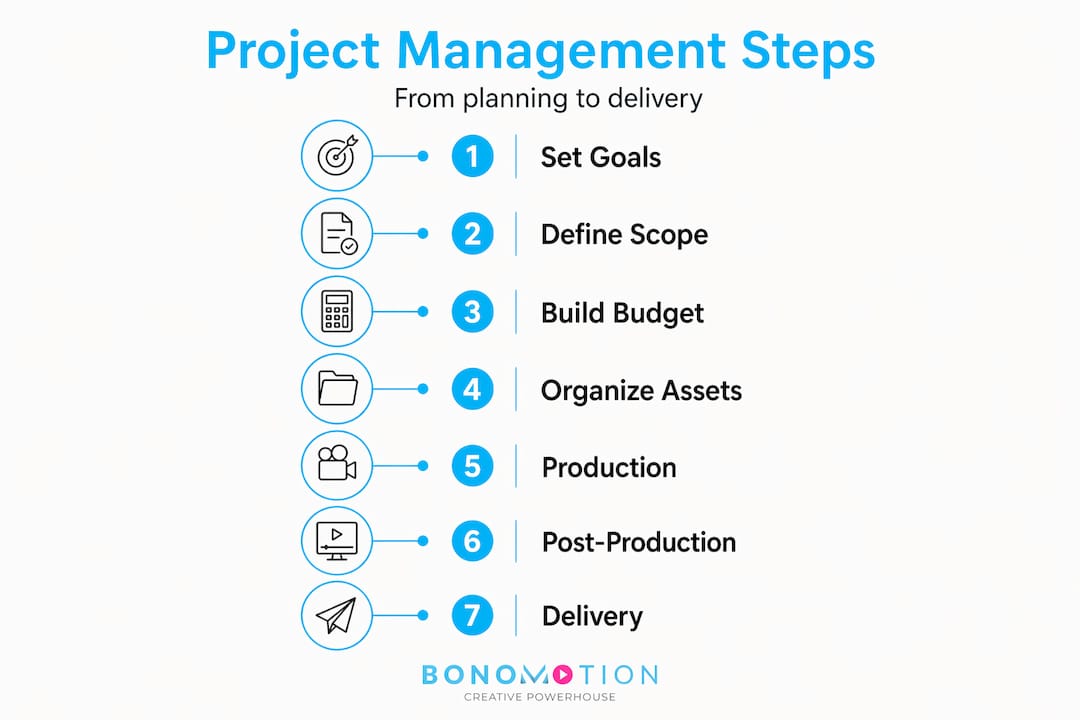
Every video project that goes sideways shares a common trait: it started without a solid plan. Strong video project management begins well before the first shoot day, in the prep work that defines what you are making, why you are making it, and what it will cost.

Set goals and define your creative brief
A creative brief is not a formality. It is the contract your entire team works from. Your brief should answer who the video is for, what action it should inspire, what the tone and visual style are, and what success looks like in measurable terms. Without this foundation, every production decision becomes a judgment call, and judgment calls are where projects drift.
Define scope with the same rigor. Scope creep in video production is particularly dangerous because a single “small change” can cascade into reshoots, re-edits, and licensing complications. Document every deliverable, specify how many revision rounds are included, and get written sign-off from stakeholders before production begins.
Build a budget that accounts for the unexpected
A detailed budget should break down pre-production, production, and post-production costs separately. Do not treat post-production as an afterthought. Under-budgeting post-production changes is a primary cause of project derailment, and it catches more teams off guard than any other budget line. Industry best practices recommend a 10-15% contingency fund specifically to absorb unexpected licensing fees, last-minute reshoots, and revision overruns.
A thorough video project budget planning guide can help you think through every cost category before you commit. Pair that with a clear RACI chart so everyone on your team knows who is responsible, accountable, consulted, and informed at each stage.
Pro Tip: Build your budget bottom-up by pricing out each deliverable and production day individually, then add your contingency on top. Top-down budgeting almost always underestimates post-production.
Organizing and managing video assets
One of the most overlooked aspects of any video project management guide is what happens to your footage and files as the project scales. You may start with a single shoot day and end up managing hundreds of raw clips, multiple edit versions, music licenses, motion graphics files, and approved exports across several team members.
File storage vs. digital asset management
There is a meaningful difference between storing files and managing them. A shared drive stores files. A Digital Asset Management (DAM) system lets you find, control, and reuse them with precision. DAM platforms organize content using metadata: tags that describe the content, usage rights, version history, and format specifications. When you treat your video files as living, governed assets rather than static folders, you gain control over version, rights, and context at every stage of production.
At scale, manual tagging becomes a liability. AI-native DAM platforms use content recognition and auto-tagging that improves accuracy as your library grows, solving the exact problem that makes large asset libraries feel unmanageable. Early implementation of a metadata tagging schema is also significantly cheaper than retroactive tagging once your library has grown. Set the taxonomy before you ingest footage, not after.
Workflow automation and version control
Automating workflow transitions based on metadata states is more reliable than relying on manual alerts or memory. Metadata-driven automation prevents communication breakdowns and missed handoffs between editorial stages. For example, when an editor marks a cut as “Picture Lock” in your DAM, that status can automatically trigger notifications to your colorist, audio mixer, and project manager without anyone sending a single email.
Version control deserves equal attention. Every revision should be timestamped and stacked in a centralized system, so your team is never guessing which file is current. The ability to roll back to a previous cut without hunting through email threads is not a luxury. It is a basic operational requirement.
Pro Tip: Name every file with a consistent convention from day one: ProjectName_Version_Date_Initials. This single habit eliminates most file confusion in post-production.
| Feature | File storage | DAM system |
|---|---|---|
| Searchability | Folder browsing only | Metadata and keyword search |
| Version control | Manual file naming | Automatic versioning and history |
| Rights management | None | Usage rights and expiration tracking |
| Collaboration | Download and re-upload | Role-based access and commenting |
| Scalability | Degrades with volume | Improves with AI tagging at scale |
Executing the production phase
With a plan locked and your asset system in place, execution is where your management discipline gets tested. The production phase involves the highest concentration of moving parts: crew scheduling, location logistics, equipment, client presence, and real-time problem solving. How you manage communication and timelines here determines whether your project finishes on budget.
Consistent daily check-ins are non-negotiable. Daily production huddles build transparency and reduce the misunderstandings that lead to costly mistakes. These do not need to be long. A 10-minute morning stand-up covering what was completed, what is scheduled today, and any blockers is enough to keep a complex production on track.
Your project dashboard should display real-time budget burn alongside timeline milestones. When you can see that you have used 70% of your budget with 50% of your shoot days remaining, you can act before it becomes a crisis rather than after. A good video production schedule template built into your dashboard makes this kind of visibility automatic rather than manual.
Client management during production is where many project managers lose time they can never recover. Client review delays account for 40% of overall project timelines in typical video productions. The most effective way to address this is to establish a structured review cadence upfront: specific dates, a set number of review rounds, and a clear process for submitting feedback. Platforms that provide time-stamped video comments dramatically improve feedback clarity and reduce the back-and-forth that kills momentum.
Key production-phase practices every project manager should enforce:
- Lock locations, permits, and equipment at least two weeks before each shoot day
- Assign a single point of contact on the client side for all approvals
- Document every client change request in writing with a timeline and cost impact noted
- Build 15% buffer time into each shoot day schedule for setup and unexpected delays
- Conduct a post-shoot debrief with your crew to capture lessons before they are forgotten
Managing post-production and final delivery
Post-production is where projects either come together with precision or unravel from disorganization. The editing phase concentrates all of your earlier decisions, and any ambiguity in your asset library, naming conventions, or approval process will surface here at the worst possible time.
A structured post-production workflow moves through these stages in sequence:
- Ingest and organize all raw footage into your DAM with consistent metadata applied at upload
- Create a rough cut and share it with internal stakeholders before sending to the client for review
- Collect structured feedback using a review platform with time-coded comments, and consolidate into a single revision document
- Apply revisions in numbered edit versions (V1, V2, V3) with notes in each file’s metadata
- Lock picture only after written client approval, then route to color correction and audio finishing
- Prepare deliverables against a technical checklist matched to each distribution platform
- Archive the project in your DAM with all final files, licenses, and project documentation cataloged
Centralized version-controlled platforms eliminate confusion over which file is the current edit. Without them, teams routinely make corrections to the wrong version and lose hours of work.
| Deliverable type | Common specs to verify |
|---|---|
| Broadcast TV | ProRes 4444, 29.97fps, broadcast-safe color |
| Social media (horizontal) | H.264, 16:9, 1920×1080, stereo audio |
| Social media (vertical) | H.264 or H.265, 9:16, 1080×1920 |
| Conference / event screen | H.264, 1920×1080, 48kHz audio, no letterbox |
| Web / OTT streaming | H.264 or H.265, CBR encoding, platform spec matched |
Measure project success before you close the file. Delivery date vs. planned date, budget variance, number of revision rounds, and client satisfaction are the four metrics that tell you where your process worked and where it needs adjustment on the next project.
My honest perspective on what actually works
I have worked on enough video productions to tell you that the gap between a well-managed project and a chaotic one almost never comes down to creative talent. It comes down to process discipline in the first two weeks. In my experience, the teams that invest time in setting up their DAM taxonomy and metadata schema before a single clip is ingested will save three to five times that investment in post-production. The teams that skip it because they are in a hurry spend weeks hunting for files and second-guessing which edit is current.
The 80/20 rule applies directly here. Focus 80% of active management on the 20% of production stages that require human judgment and coordination. Those are your shoot days, your first client review, and your final delivery. Everything else can and should be systematized.
The other thing I would tell you plainly: budget your contingency and protect it. Do not let scope creep consume it before post-production starts. The contingency fund is not extra money. It is your project’s immune system. The projects I have seen go most sideways are the ones where the team spent the contingency on production extras and had nothing left when the client wanted a fifth round of revisions.
Balancing creativity with process is not a tension you resolve. You accept it and build systems that give your creative team the freedom to do their best work because the logistics are handled.
— Bernard
How Bonomotion can manage your next video project

Managing a complex video project requires more than a checklist. It requires an experienced producer who can hold the process together from brief to delivery, anticipate problems before they become delays, and communicate clearly with your team and stakeholders throughout.
At Bonomotion, we have been doing exactly that since 2003. Whether you need corporate video production for executive messaging and internal communications, or commercial video production built for brand campaigns and product launches, our producers operate as a direct extension of your team. Every project includes structured planning, asset governance, transparent timelines, and a final product that meets your technical and creative specifications without the chaos that typically defines video production workflows. Contact Bonomotion to discuss your next project and put a process behind your production.
FAQ
What are the first steps to manage a video project?
Start with a detailed creative brief that defines goals, audience, and deliverables, then build a budget that includes a 10-15% contingency fund. Lock project scope and assign roles before any production activity begins.
How do you organize video assets across a large production?
Use a Digital Asset Management system with consistent metadata tagging and file naming conventions from the first day of ingest. Centralized DAM platforms with version control keep your team aligned and eliminate confusion over file versions.
Why do video projects go over budget?
Post-production changes and client revision rounds are the leading causes of budget overruns in video production. A structured review process with a fixed number of revision rounds and a contingency fund protects your budget when unexpected costs arise.
How often should you communicate with your team during production?
Daily stand-ups of 10-15 minutes are the standard best practice during active production. Combining these with a real-time project dashboard covering timeline and budget burn gives your team the visibility needed to catch problems early.
How do you speed up the client review process?
Use a review platform that allows time-stamped comments directly on the video, and designate a single client-side approver for all feedback. Client review delays can account for 40% of total project timelines, so structure matters more than speed.