

A video editing workflow is defined as a structured sequence of stages that transforms raw footage into a finished, deliverable video. The process moves through six core phases: project setup, ingest and organization, rough cut, fine cut, finishing passes, and export. Tools like Adobe Premiere Pro, DaVinci Resolve, and Descript each support specific stages of this process, making software selection a foundational decision. Whether you are learning how to edit videos for the first time or formalizing a process you have been doing intuitively, understanding this sequence is what separates consistent professionals from creators who struggle with rework and missed deadlines.
What is a video editing workflow and why does it matter?
A video editing workflow is the step-by-step post-production system that organizes every task from the moment footage arrives on your drive to the moment a finished file leaves for delivery. The industry term for this process is “post-production pipeline,” and the two phrases describe the same discipline. Treating your editing process as a pipeline rather than a loose collection of tasks changes how you make decisions, allocate time, and collaborate with others.
The reason this structure matters is dependency. Each stage in the video editing process depends on the previous one being complete. You cannot color grade before picture is locked. You cannot mix audio before the timeline is stable. Building workflows around dependencies rather than individual tasks prevents rework and keeps collaborative teams aligned. For aspiring videographers, internalizing this logic early is the single fastest way to close the gap between amateur and professional output.
What are the essential stages of a video editing workflow?
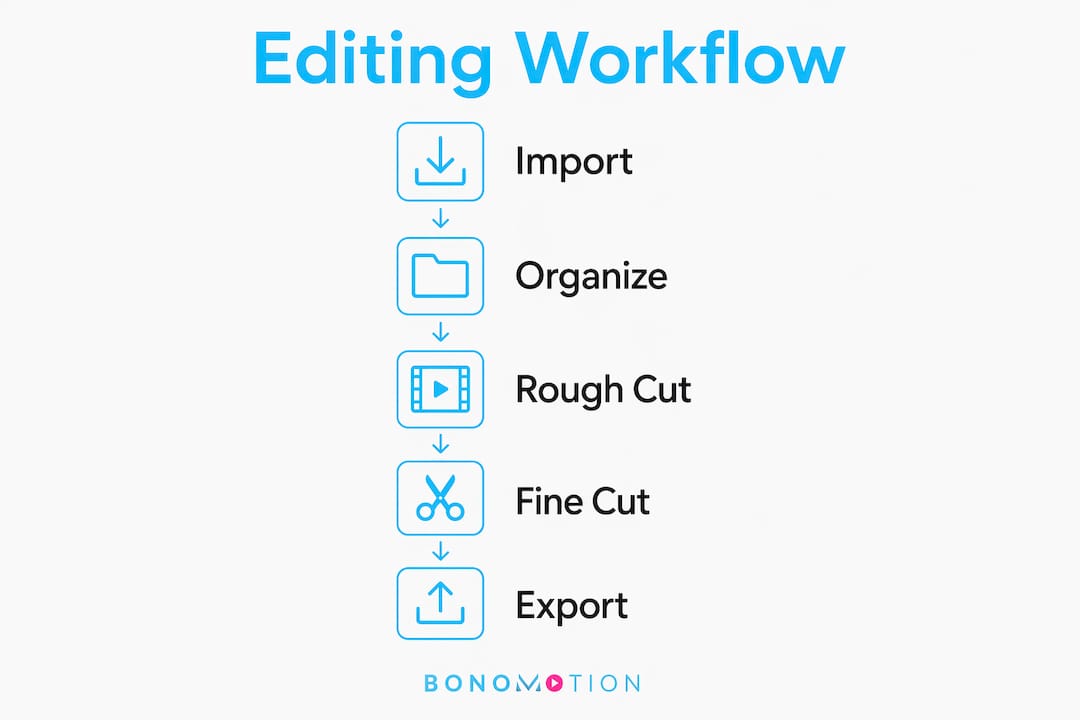
The standard workflow maps to six sequential stages, each with a distinct purpose and set of deliverables.
- Project setup. Before a single clip is imported, you define your folder structure, file naming conventions, project settings (frame rate, resolution, color space), and backup strategy. A consistent naming system like “ProjectName_Date_CameraRoll_ClipNumber” prevents confusion when a project grows to hundreds of files.
- Ingest and organization. Footage is transferred from cards or drives, verified for integrity, and logged into bins or folders by scene, camera angle, or interview subject. Disorganized footage is the single most common cause of mid-project slowdowns, making this stage a direct investment in editing speed.
- Rough cut. You assemble your selects into a narrative skeleton. The goal here is story structure, not polish. Starting from carefully chosen selects makes the rough cut faster and revision cycles shorter.
- Fine cut. Trimming, pacing adjustments, and transition decisions happen here. This is where professionalism clearly shows, because every frame decision either serves the story or distracts from it.
- Finishing passes. Audio mixing, color grading, motion graphics, and visual effects are applied after picture lock, meaning the visual edit is final and no clip changes will occur. Professional color finishing requires exporting reference files with metadata and confirming a locked timeline to avoid costly rework.
- Export and delivery. Files are rendered to platform-specific formats and codecs. Opening the exported file at full resolution and verifying all specifications against the delivery requirements is the final quality control gate before the video reaches its audience.
Pro Tip: Create a project template folder in your operating system with all subfolders pre-built. Duplicate it at the start of every new project. This single habit eliminates setup time and enforces consistency across every job you take on.
How do software tools support the video editing workflow?
Software is not just where editing happens. It is the infrastructure that either enforces or undermines your workflow discipline. The right tool for each stage of the video editing process makes a measurable difference in both speed and output quality.
- Adobe Premiere Pro is the industry standard for timeline-based editing. Its non-destructive editing model means every trim and cut happens on the timeline without altering original media files, giving you full creative control and the ability to revert any decision. Premiere’s bin structure, proxy workflow, and integration with Adobe After Effects make it well-suited for the full pipeline from ingest through export.
- DaVinci Resolve by Blackmagic Design integrates color grading, audio post-production (Fairlight), and visual effects (Fusion) into a single application. For creators who want a single-tool pipeline, Resolve reduces the number of handoffs between applications and keeps the project file unified.
- Descript approaches the video editing process from a transcript-first perspective. You edit the transcript like a document, and the video follows. Its AI-powered silence removal and automatic captions make it particularly effective for interview-heavy content and podcast video.
- Kdenlive is the leading open-source option for budget-conscious creators on Linux, Windows, or macOS. It supports multi-track editing, proxy clips, and a range of export formats without licensing costs.
AI-first, human-final hybrid workflows are now the standard for high-volume creators. AI tools handle captions, silence removal, and rough assembly; human editors handle pacing, story judgment, and finishing. This division of labor maximizes time savings without sacrificing creative quality. For a broader foundation on production concepts, Bonomotion’s beginner’s production guide covers the full scope from pre-production through delivery.
Pro Tip: If you are working in Adobe Premiere Pro on a laptop, enable proxy editing from the start. Proxies are low-resolution copies of your footage that play back smoothly during editing. You switch back to full resolution only at export, and your timeline never drops frames.
What are common challenges in video editing workflows and how to overcome them?
Most workflow failures trace back to a small set of repeatable mistakes. Recognizing them before they happen is the most efficient form of quality control.
- Skipping the ingest phase. Editors who import footage directly and start cutting without organizing first create a debt they pay back in search time, duplicate clips, and missed takes. Spend 20 minutes organizing before you touch the timeline.
- Polishing during the rough cut. Polishing too early forces backtracking and reduces workflow efficiency. Color correcting a shot that gets cut in the fine cut is pure wasted effort. Resist the urge to perfect anything until picture is locked.
- Skipping picture lock. Sending a timeline to audio post or color without declaring picture lock creates a conforming problem. Audio post conform standards recommend 10 seconds of handles on clips to allow flexibility in dialogue editing if picture changes happen after lock. Without a formal lock, those handles get consumed by surprise revisions.
- Poor version control. Saving over your project file instead of creating versioned saves (v01, v02, v03) means one bad decision can erase hours of work. Use a naming convention and save a new version at the start of every editing session.
- No QC checkpoint before delivery. Scheduling quality-control checkpoints early and throughout the process reduces technical failures at the delivery stage. Watch the exported file from start to finish on the target playback device before sending it to a client.
Pro Tip: Set a calendar reminder to back up your project file and media to a second drive at the end of every editing day. Drive failures are not rare. Losing a project to a hardware failure after skipping backups is a lesson that only needs to happen once.
How can you design an efficient and repeatable editing workflow?
An efficient video editing workflow is not built once. It is refined over dozens of projects until the process becomes second nature. The goal is a system you can hand to a collaborator or return to after a week away and pick up without confusion.
The table below compares a reactive approach (how most beginners edit) against a structured workflow approach (how professionals operate):
| Workflow element | Reactive approach | Structured approach |
|---|---|---|
| File organization | Clips imported as-is, named by camera | Renamed, binned by scene and take before editing begins |
| Rough cut method | Polish as you go | Assemble selects first, ignore polish entirely |
| Picture lock | Informal or skipped | Declared formally before audio and color begin |
| Version control | Single project file overwritten | Versioned saves (v01, v02) at each session |
| Export QC | File sent immediately after render | Full playback review on target device before delivery |
| AI tool use | None or ad hoc | Integrated for captions, silence removal, and rough assembly |
The structured approach does not require more time overall. It front-loads organization so that every subsequent stage moves faster. A well-managed video project follows the same logic: decisions made early in the process protect time and quality downstream.
Incorporating AI tools at the rough cut stage is now a standard best practice for video editing workflow guides aimed at 2026 creators. Tools like Descript and Adobe’s auto-caption features handle the mechanical work, freeing your attention for the judgment calls that actually define the quality of the final product. For scheduling the pre-edit phases that set up a clean workflow, Bonomotion’s production schedule guide offers a practical template you can adapt immediately.
Why discipline beats creativity in the editing room
After working on productions ranging from corporate brand films to multi-day conference coverage, the pattern I keep seeing is this: the editors who produce the best work fastest are not the most technically gifted. They are the most disciplined about process.
Creative instinct matters enormously in the fine cut and finishing stages. But it is wasted energy if the project is disorganized, the rough cut is half-polished, or the timeline is unstable when audio post begins. I have watched talented editors spend three hours hunting for a clip that a 20-minute ingest session would have made instantly findable.
The hybrid AI and traditional editing approach is where I see the most meaningful efficiency gains right now. AI handles the mechanical passes; the human editor handles the story. That division is not a compromise. It is the most honest description of what each does well. The mistake I see creators make is treating AI tools as a replacement for workflow discipline rather than a complement to it. A disorganized project fed into an AI tool produces disorganized output faster.
My honest advice: build your workflow template before you need it. Set it up on a quiet day, test it on a small project, and refine it. When a real deadline arrives, you will not be making structural decisions under pressure. You will be editing.
— Bernard
Take your video production to the next level with Bonomotion
Whether you are building your first editing workflow or managing a complex multi-camera production, having an experienced production partner changes the outcome.

Bonomotion has been delivering high-impact video productions since 2003, working with startups, growing brands, and Fortune 100 companies across Miami, Florida, and nationwide. Every project is guided by an experienced producer who manages the full pipeline from pre-production through final delivery. If your project demands a polished, professional result, explore Bonomotion’s corporate video production services and see how a structured, expert-led workflow translates directly into a stronger final product.
FAQ
What is a video editing workflow in simple terms?
A video editing workflow is the structured sequence of steps that takes raw footage from a camera and transforms it into a finished, deliverable video. The core stages are project setup, ingest and organization, rough cut, fine cut, finishing passes, and export.
What software is best for a beginner video editing workflow?
Adobe Premiere Pro and DaVinci Resolve are the two most widely used professional tools, with DaVinci Resolve offering a free version that includes color grading and audio post-production in a single application. Descript is a strong choice for interview or talking-head content because it lets you edit video by editing a text transcript.
What does picture lock mean in the video editing process?
Picture lock means the visual edit is declared final and no further clip changes will be made. It is the trigger point for audio post-production and color grading to begin, because both disciplines require a stable, unchanging timeline to do their work correctly.
How do AI tools fit into a modern video editing workflow?
AI tools handle repetitive mechanical tasks such as caption generation, silence removal, and rough assembly, while human editors focus on pacing, story judgment, and finishing quality. The most effective approach is an AI-first, human-final hybrid workflow that maximizes speed without sacrificing creative control.
How do I avoid rework in my video editing workflow?
The two most common causes of rework are skipping formal picture lock before finishing passes and polishing shots during the rough cut phase. Declaring picture lock formally and resisting any polish until the fine cut is approved eliminates the majority of backtracking in a standard post-production pipeline.
Key takeaways
A structured video editing workflow, built around stage dependencies from project setup through export, is the single most reliable way to produce consistent, professional-quality video on deadline.
| Point | Details |
|---|---|
| Follow the six-stage sequence | Move from project setup through export in order; skipping stages creates rework. |
| Organize before you cut | Logging and binning footage before editing begins eliminates mid-project slowdowns. |
| Declare picture lock formally | Audio post and color grading require a stable, locked timeline to function correctly. |
| Use AI for mechanical tasks | AI tools handle captions and silence removal; human editors handle story and pacing. |
| QC every export before delivery | Play back the finished file on the target device to catch format or playback errors before the client does. |