

On-site video is defined as visual media embedded directly within a brand’s own digital property, such as a website, app, or blog, rather than hosted on a third-party platform like YouTube or Vimeo. For content creators and marketers, this distinction matters enormously. Approximately 91% of marketers report that on-site video boosts page traffic, and 88% say it improves user understanding. Those numbers reflect a format that does real work inside your owned channels, not borrowed ones. Whether you are covering a live conference in Miami or launching a product campaign, understanding on-site video production is the first step toward stronger audience engagement and more compelling storytelling.
What is on-site video and how does it differ from off-site content?
On-site video refers to video content that lives on a digital property you own and control. Think of a product demo embedded on a landing page, a behind-the-scenes clip on your event website, or a CEO message hosted directly on your company’s homepage. The industry also uses the term “owned video” to describe this category, and both phrases apply to the same core concept.

Off-site video, by contrast, lives on platforms you do not control. YouTube, TikTok, and Instagram Reels are the most common examples. Those platforms distribute your content through their own algorithms, which can expand your reach but also limit your ability to customize the viewing experience, collect first-party data, or control what appears next to your video.
On-site video offers greater content control and customization, improving SEO and user experience, while off-site videos reach broader audiences via platform algorithms but offer less content control. The practical implication is clear. When you embed video on your own site, you decide the context, the call to action, and the data you collect. That level of control is what makes on-site video a priority for brands serious about conversion.
What are the benefits of on-site video for marketing and event storytelling?
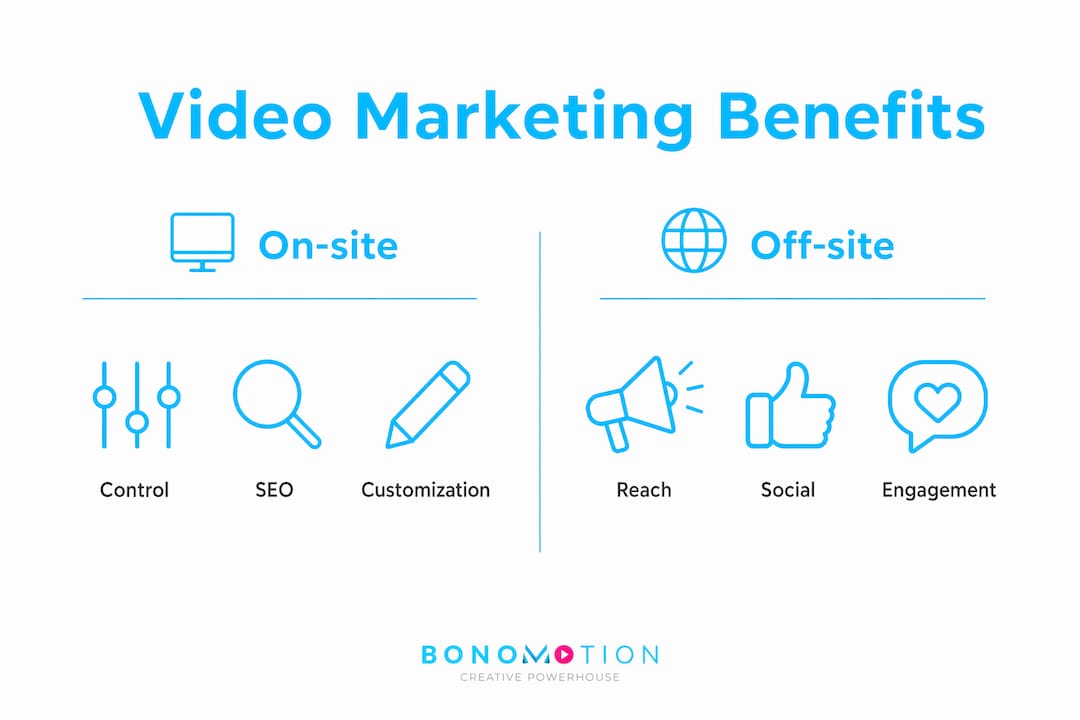
On-site video delivers measurable advantages across engagement, comprehension, and search performance. The benefits are not theoretical. They show up in time-on-page metrics, bounce rates, and conversion data.
The core advantages include:
- Higher engagement. Visitors who watch embedded video spend significantly more time on a page than those who do not. More time on page signals relevance to search engines, which supports SEO.
- Better product and service understanding. 88% of marketers say on-site video improves how well visitors understand what a brand offers. For complex services like corporate event production, this is critical.
- Increased conversion rates. On-site video drives conversions when it meets advertiser standards for viewability, targeting data, and production quality. A well-placed video on a pricing page or event registration form can move a hesitant visitor to act.
- Content control and SEO. Hosting video on your own property lets you optimize titles, descriptions, and schema markup without competing against YouTube’s algorithm.
- Repeatable information delivery. On-site video automates the delivery of repeatable information, freeing live interactions for higher-value activities like coaching and relationship-building.
For event marketers specifically, on-site video transforms a static event page into a living preview. A two-minute highlight reel from last year’s conference, embedded directly on the registration page, does more persuasive work than three paragraphs of copy.
How to produce high-quality on-site video: tools, techniques, and tips
Quality on-site video does not require a full production crew for every shoot. A structured DIY approach produces content that is authentic, repurposable, and effective for both SEO and engagement goals.
A successful DIY on-site video workflow prioritizes quick setup, short clips of 30–60 seconds, and capturing unscripted moments to create relatable content that supports SEO and engagement goals. Follow this four-stage process:
- Plan your shots. Identify the key moments you need to capture before the event or shoot begins. For a conference, this means speaker introductions, audience reactions, and sponsor activations.
- Set up your equipment. A modern smartphone with a stabilizer gimbal and a clip-on lavalier microphone produces broadcast-quality audio and sharp visuals. Natural light or a portable LED panel handles most indoor situations.
- Film with framing in mind. Place the subject’s head in the upper third of the frame and avoid plain white walls. A visually engaging background, such as a branded event backdrop or a busy conference floor, adds depth and context.
- Capture natural moments. Unscripted exchanges, candid reactions, and real conversations build credibility faster than polished scripts. Authentic content filmed on-site builds stronger brand credibility and ranks better on search.
- Organize and edit your files. Label clips by scene and speaker immediately after filming. Use editing software like Adobe Premiere Pro, DaVinci Resolve, or CapCut to trim, color-correct, and add captions before embedding.
Pro Tip: Film at least three versions of every key clip: a 60-second version for your website, a 30-second cut for email campaigns, and a 15-second vertical crop for social media. One shoot produces three assets.
The most common mistake in DIY on-site video is poor audio. Viewers will tolerate average visuals, but they will abandon a video with muffled or inconsistent sound within seconds. Prioritize your microphone before your camera.
On-site video vs. off-site video: which strategy fits your goals?
The choice between on-site and off-site video is not binary. Most effective video marketing programs use both. The key is understanding what each format does best.
| Factor | On-site video | Off-site video |
|---|---|---|
| Content control | Full control over player, context, and CTA | Limited by platform rules and interface |
| Audience reach | Limited to your existing site traffic | Expanded through platform algorithms |
| SEO benefit | Direct benefit to your domain authority | Benefits the hosting platform primarily |
| Data and metrics | First-party data, full analytics access | Platform-provided metrics only |
| Conversion focus | High, when placed near purchase decisions | Lower, due to platform distractions |
| Production cost | Same production, lower distribution cost | Same production, platform handles distribution |
On-site video supports conversion most effectively when it meets high production and advertising quality standards similar to digital ads. Off-site video on platforms like YouTube or LinkedIn builds awareness and drives new visitors to your site, where on-site video then closes the gap between interest and action. The two formats work as a funnel, not as competitors.
For event marketers, the practical integration looks like this: publish a teaser on YouTube to drive registrations, then embed the full event recap on your website to retain and re-engage attendees after the event ends.
How to use on-site video effectively at live events
Live events are the highest-value environment for on-site video production. The energy, the speakers, the audience reactions, and the brand moments are all happening in real time, and capturing them correctly turns a single event into months of content.
Effective on-site video content at live events includes:
- Customer stories and testimonials. Pull a satisfied client aside for a 60-second on-camera comment. Embed that clip on your case study page the following week.
- Behind-the-scenes footage. Show the setup, the rehearsals, and the team at work. Authentic behind-the-scenes content builds trust and ranks well on search because it signals genuine activity.
- FAQ answer clips. Film your speakers or executives answering the three questions your audience asks most often. These clips embed directly into your FAQ pages and reduce support volume.
- Real-time highlights. Capture keynote moments, panel discussions, and audience Q&A sessions. Edit and publish same-day clips to your event website to keep remote audiences engaged.
Pro Tip: Assign one dedicated person to video capture for every four hours of event programming. That person’s only job is to film. Splitting attention between filming and event management produces unusable footage.
Planning your content types before the event is as important as the filming itself. Create a shot list that maps each video type to a specific page on your website. A testimonial clip belongs on your services page. A keynote highlight belongs on your event recap page. Matching content to destination before you film prevents the common problem of having great footage with nowhere to put it.
Video serves as a foundation for consistent messaging, complementing rather than replacing live interactions in marketing and event programs. The live event creates the moment. On-site video preserves it and extends its reach far beyond the room.
Key takeaways
On-site video is the most direct tool a marketer has for converting website visitors, because it delivers controlled, measurable, high-quality content on the exact pages where decisions are made.
| Point | Details |
|---|---|
| On-site video definition | Video embedded on brand-owned digital properties, not third-party platforms. |
| Core marketing benefit | 91% of marketers report it boosts page traffic; 88% say it improves user understanding. |
| Production priority | Audio quality matters more than camera quality. Invest in a microphone first. |
| Event content strategy | Map each video type to a specific destination page before filming begins. |
| On-site vs. off-site | Use off-site video for reach and on-site video for conversion. Both are necessary. |
What 20 years of event video taught me about on-site production
The biggest mistake I see marketers make is treating on-site video as a documentation exercise. They film the event, upload the footage, and call it done. That approach misses the entire point.
On-site video is a conversion asset. Every clip you embed on your website should have a job. A testimonial builds trust. A product demo answers objections. A behind-the-scenes clip humanizes your brand. When you film with that purpose in mind, your shot list changes completely, and so do your results.
The DIY production challenge is real. Framing, lighting, and audio are skills that take time to develop, and the gap between amateur and professional footage is visible to every visitor who lands on your page. I have seen brands invest heavily in paid traffic, then lose those visitors in seconds because the embedded video looked like it was filmed in a parking garage. Production quality is not vanity. It is a direct signal of brand credibility.
The trend I am watching closely is the integration of on-site video with live event streaming. Brands that capture their events professionally and immediately embed highlights on their event pages are seeing compounding returns: better SEO, longer session times, and higher registration rates for future events. The live moment and the on-site asset reinforce each other in ways that neither achieves alone.
My honest recommendation is to stop treating video as a content type and start treating it as infrastructure. Build it into every event plan, every campaign brief, and every website update. The brands doing this consistently are the ones pulling ahead.
— Bernard
Bonomotion’s approach to on-site video production
Producing on-site video that actually performs requires more than a camera and a shot list. It requires a production team that understands your audience, your brand, and the specific moments worth capturing.
Bonomotion has delivered high-impact corporate video production for startups, growing brands, and Fortune 100 companies since 2003. From multi-day conferences in Miami to nationwide brand campaigns, every project is guided by an experienced producer who maps your objectives to a clear content plan. The result is polished, purposeful on-site video that works on your website long after the event ends. For marketers who want professional support without the guesswork of DIY production, Bonomotion’s commercial video production services cover everything from event capture to final delivery.
FAQ
What is the on-site video definition in marketing?
On-site video is video content embedded directly on a brand’s own website, app, or digital platform rather than hosted on a third-party channel like YouTube. It gives brands full control over the viewing experience, data collection, and conversion context.
How long should on-site video clips be?
Short-form clips of 30–60 seconds maximize engagement and repurposing potential for most on-site applications. Longer formats, such as full event recaps or webinars, work well on dedicated content pages where visitors are already committed to learning.
What types of on-site video content perform best?
Customer testimonials, behind-the-scenes footage, FAQ answer clips, and event highlights are the formats that build the most trust and SEO value. Each type should be matched to a specific page on your website before filming begins.
How does on-site video improve SEO?
Embedding video on your own domain increases time-on-page, reduces bounce rates, and allows you to add schema markup and optimized metadata that benefit your domain directly. Off-site hosting on YouTube primarily benefits YouTube’s search rankings, not yours.
When should you hire a professional video production company?
Hire a professional team when the event or campaign is high-stakes, when DIY audio and framing quality falls short of your brand standards, or when you need same-day editing and publishing for a live event. Professional production pays for itself when the resulting video is used across multiple campaigns and pages over time.