

Educational event video formats are the defined set of recording and presentation styles used to capture, package, and distribute content from conferences, workshops, and training sessions. The right format determines whether your event content lives on as a lasting educational resource or disappears after the closing keynote. For event coordinators and educational organizations, choosing among full session recordings, highlight reels, interview clips, and explainer styles is not a creative preference. It is a strategic decision that directly affects learner retention, audience reach, and content ROI. This guide breaks down the top formats, with production specifics you can act on immediately.
1. full session recordings: the backbone of educational event video formats
Full session recordings are the most complete form of event documentation, capturing entire presentations, panel discussions, and keynote speeches from start to finish. These videos serve as evergreen educational content, accessible to attendees who want to review material and to audiences who could not attend in person.
The industry standard for a high-impact setup uses 2–3 cameras with distinct roles: a locked wide-angle shot that establishes the stage, a close-up or tracking camera focused on the speaker, and a roaming camera capturing audience reactions and atmosphere. Each angle serves a different instructional purpose. The wide shot provides context, the close-up builds connection with the speaker, and the roaming angle adds energy and authenticity.
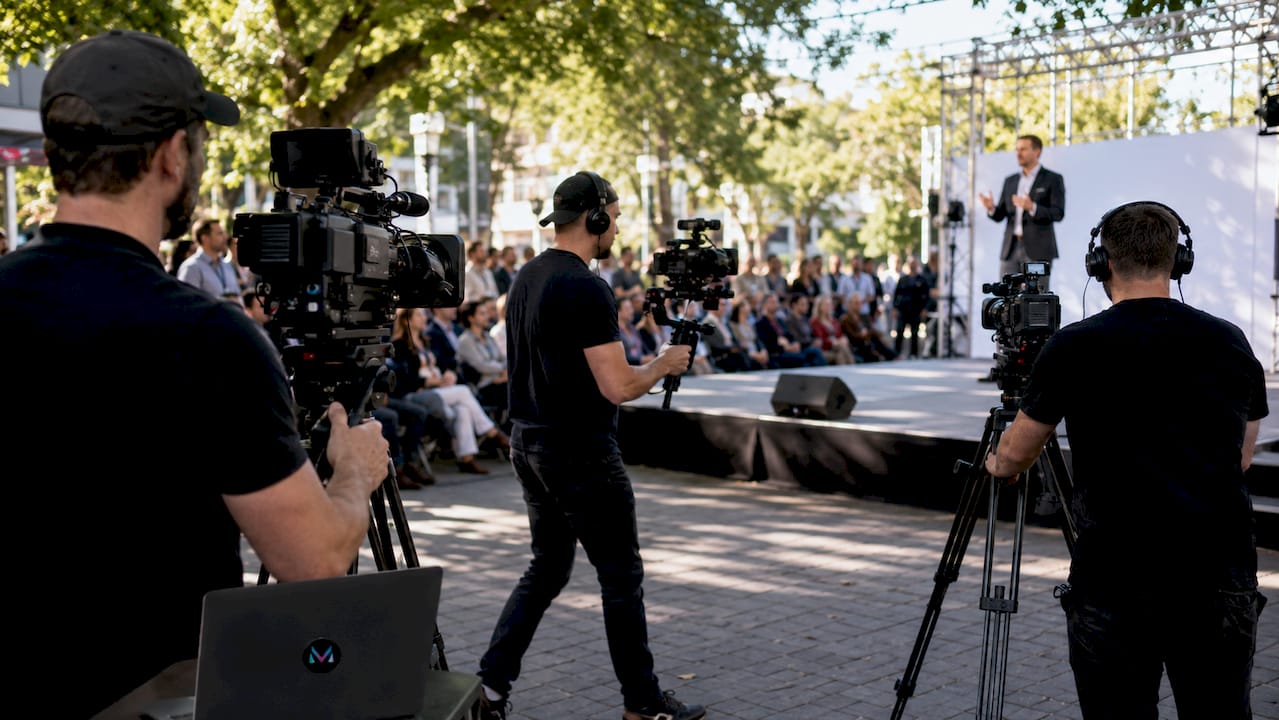
Audio quality is the single most critical variable in full session recordings. Lavalier microphones and direct board feeds provide audio redundancy, meaning if one source fails, the others cover the gap. Poor audio quality is the top reason learners disengage from educational videos, making it a higher priority than camera resolution or lighting.
Professional multi-camera event recording techniques run $2,000–$5,000 per day, with full session recordings typically delivered within 2–3 weeks. That timeline accounts for multi-track audio syncing, color grading, and chapter markers that make long-form content navigable.
Pro Tip: Record 10–20 seconds of empty room tone before each session begins. This ambient audio fills gaps between microphone feeds during editing and produces natural-sounding transitions that would otherwise require expensive noise-matching software.
2. highlight reels: short-form videos that drive post-event engagement
Highlight reels are condensed, emotionally driven edits that capture the best moments of an educational event in a format designed for immediate impact. They are the most widely distributed video asset produced from any conference or workshop.
Highlight reels run 2–5 minutes and typically include venue establishing shots, crowd atmosphere, speaker highlights, and audience reactions. Social clips cut from the same footage run 30–60 seconds each, optimized for LinkedIn, Instagram, and YouTube Shorts. These shorter cuts extend the event’s promotional life well beyond the closing day.
Effective highlight reels follow a clear narrative arc. The structure that works best for educational events moves from anticipation (pre-event setup, registration lines, sponsor logos) through peak energy (keynote moments, audience applause, panel exchanges) to resolution (networking, closing remarks, branded end cards). This arc mirrors the emotional experience of attending, which is why highlight reels consistently outperform raw session clips in social sharing metrics.
The editing discipline required for a strong highlight reel is more demanding than most coordinators expect. Every cut must serve the story. Here is a practical editing sequence for a 3-minute educational event highlight reel:
- Open with a 10-second branded title card or venue aerial shot.
- Layer in 3–4 speaker sound bites of 8–12 seconds each, chosen for clarity and energy.
- Cut to audience reaction shots between each speaker clip to maintain visual rhythm.
- Include one or two attendee interaction moments to show community and engagement.
- Close with a branded call-to-action card pointing to the next event or registration page.
Pro Tip: Shoot B-roll of signage, sponsor walls, and registration desks during setup, before the event floor gets crowded. These clean shots are far more usable in editing than footage captured mid-event with people walking through the frame.
3. interview and testimonial formats: adding authenticity to event coverage
Interview and testimonial videos are structured recordings of speakers, panelists, or attendees sharing personal insights, reactions, or expertise. They add a human layer to event documentation that full session recordings and highlight reels cannot replicate.
Three interview formats work well in educational event contexts:
- Pre-event interviews capture speaker intentions and topic previews, useful for promotional content distributed before the event opens.
- On-site interviews recorded during breaks or in a dedicated interview zone capture real-time reactions while energy is high. A simple setup with a branded backdrop, a single camera, and a wireless lapel mic produces broadcast-quality results.
- Post-event testimonials from attendees document learning outcomes and emotional responses, making them the most persuasive format for future event marketing.
The technical bar for testimonial videos is lower than for full session recordings, but audio clarity remains non-negotiable. A wireless lapel mic on the speaker and a shotgun mic on the camera provides the redundancy needed to guarantee clean audio even in noisy conference environments. Background noise from adjacent sessions or HVAC systems is the most common reason testimonial footage ends up unusable.
Testimonial videos integrate naturally with other formats. A 60-second attendee testimonial placed at the end of a full session recording adds social proof. A speaker interview embedded in a post-event email campaign drives registration for the next event. These clips function as connective tissue across your entire content strategy.
4. educational webinar and explainer video formats: clarity-first styles
Webinar and explainer formats prioritize instructional clarity over production spectacle. They are the best video formats for education when the goal is concept transfer rather than event documentation.
| Format | Best Use Case | Typical Length | Production Complexity |
|---|---|---|---|
| Lecture with slides | Full session replay, post-event LMS upload | 20–60 min | Low |
| Screencast | Software tutorials, step-by-step walkthroughs | 5–15 min | Low |
| Whiteboard animation | Abstract concept explanation | 2–6 min | Medium |
| Motion graphics | Data visualization, process overviews | 1–4 min | High |
| Talking head with B-roll | Expert commentary, course modules | 5–20 min | Medium |
Mixing lecture recordings, animations, and screencasts reduces cognitive load and improves learner engagement by segmenting information into digestible units. A 45-minute keynote recording becomes far more useful when broken into five 8-minute modules, each covering a single concept. This segmentation also makes content easier to update when specific sections become outdated.
Explainer videos complement live event content by going deeper on concepts that a speaker only had time to introduce. A conference session on data privacy might run 40 minutes live, but a 3-minute motion graphics explainer on GDPR compliance can be produced post-event and distributed alongside the full recording. The two formats serve different learning moments and different audience segments.
Breaking lectures into modular videos under six minutes improves student engagement and allows paced review. That principle applies directly to post-event content packaging. When you upload a full conference day to a learning management system like Canvas or Moodle, chapter-marked segments outperform single long files in completion rates.
5. choosing the right format based on learning goals
The best video format for any educational event is determined by the learning objective, not by production preference or budget alone. Format selection is a pedagogical decision as much as a production one.
Video works best for demonstrating concepts, text for depth, and interactive elements for practice. That framework gives event coordinators a clear decision tree. If the session goal is skill demonstration, full session video with close-up camera angles is the right choice. If the goal is motivation or community building, a highlight reel with testimonials serves better.
Learner age and attention span also drive format decisions. Optimal video lengths vary by learner type: 3–6 minutes for K-5 audiences, 6–10 minutes for middle school, and 8–15 minutes for high school and college-level learners. For professional development events targeting adult learners, sessions up to 20 minutes perform well when the content is dense and the speaker is engaging.
Consider these factors when selecting formats for your next event:
- Distribution channel: YouTube favors longer content; LinkedIn and Instagram favor clips under 2 minutes.
- Budget: Full multi-camera productions require professional crews; single-camera webinar recordings can be produced in-house.
- Post-event use: Content destined for a learning management system benefits from modular formatting and chapter markers.
- Audience familiarity: First-time attendees respond better to highlight reels; returning professionals engage more with full session recordings.
The strongest event content strategies combine at least three formats: a full session recording for depth, a highlight reel for reach, and short interview clips for authenticity. Each format reaches a different segment of your audience at a different stage of their engagement.
6. live streaming as a real-time educational video option
Live streaming is a distinct category within live event video options, enabling real-time participation from remote audiences during conferences and workshops. It transforms a physical event into a hybrid experience without requiring a separate production.
A reliable live stream for an educational event requires a dedicated encoder, a stable internet connection with at least 10 Mbps upload speed, and a separate monitoring station. Platforms like YouTube Live, Vimeo, and Zoom Webinars each handle educational content differently. YouTube Live offers the widest organic reach; Vimeo provides cleaner branding control; Zoom Webinars integrates Q&A and polling tools that support interactive learning.
The most common mistake in educational live streaming is treating it as an afterthought to the in-room production. A live stream needs its own camera angle, its own audio mix, and its own operator. Sharing a single camera feed between the in-room audience and the live stream audience produces a poor experience for both. Dedicated hybrid event production planning resolves this before the event day.
Key takeaways
The most effective approach to educational event video is combining multi-camera full session recordings with short modular edits and interview clips, because each format serves a distinct learning objective and audience segment.
| Point | Details |
|---|---|
| Multi-camera setup is the standard | Use a locked wide shot, a close-up camera, and a roaming camera for complete event coverage. |
| Audio quality outranks visual fidelity | Lavalier mics and direct board feeds prevent the top cause of learner disengagement. |
| Short-form clips extend event reach | Highlight reels of 2–5 minutes and social clips of 30–60 seconds drive post-event engagement. |
| Format choice follows learning goals | Match video style to the instructional objective: demonstration, motivation, or concept transfer. |
| Modular editing improves retention | Breaking long recordings into segments under 6–15 minutes increases completion rates on learning platforms. |
What 20 years of event production has taught me about video formats
The coordinators who get the most value from their event video are not the ones with the biggest budgets. They are the ones who decide on their distribution strategy before the cameras roll.
I have seen organizations spend $15,000 on a multi-day conference production and then upload a single unedited 6-hour file to YouTube. The content was excellent. Nobody watched it. The format did not match the audience’s behavior or the platform’s algorithm. Contrast that with a mid-size professional association that invested in a 3-camera setup, a 3-minute highlight reel, and six 10-minute session clips. Their post-event video views outperformed the previous year’s attendance by a factor of four.
The insight that most articles skip is this: the editing phase is where educational value is actually created. Raw footage captures what happened. Edited, formatted video teaches. That distinction changes how you brief your production team, how you allocate post-production budget, and how you measure success.
Audio is the other variable that separates professional results from amateur ones. Clear, professional audio keeps learners focused, and poor audio is a top reason students disengage. A $200 wireless lapel mic and a direct board feed will do more for your content’s educational impact than a second 4K camera.
My practical advice: plan for three deliverables at minimum. A full session recording for your LMS or archive, a highlight reel for social and email, and at least two speaker interview clips for future promotional use. That combination covers every audience segment and every distribution channel your organization is likely to use.
— Bernard
Elevate your event coverage with professional video production
Producing high-quality educational event video requires more than good equipment. It requires an experienced team that understands both the technical demands of multi-camera production and the instructional goals behind the content.
At Bonomotion, we have been producing corporate and educational event videos since 2003, working with Fortune 100 companies, universities, and professional associations across Florida and nationwide. Our producers manage every detail from pre-event planning through final delivery, including highlight reels turned around in 5–10 business days and full session recordings within 2–3 weeks. Whether you need a single-day conference covered or a multi-track symposium documented across multiple rooms, our team operates as a direct extension of yours. Explore our event video production services or contact us to discuss your next event.
FAQ
What are the most common educational event video formats?
The most common formats are full session recordings, highlight reels, speaker interviews, and explainer or webinar-style videos. Each serves a different purpose, from archival documentation to social media promotion.
How long should an educational event video be?
Optimal length depends on the audience: 3–6 minutes for younger learners, 6–10 minutes for middle school, and 8–15 minutes for high school and adult learners, based on 2026 research. Full session recordings can run longer when segmented with chapter markers.
What is the best camera setup for recording educational events?
A 3-camera setup using a locked wide shot, a close-up tracking camera, and a roaming camera is the industry standard for educational event coverage. This combination captures the speaker, the audience, and the atmosphere simultaneously.
Why is audio more important than video quality for educational content?
Learners disengage from videos with poor audio far more quickly than from videos with lower visual resolution. A direct XLR board feed combined with a wireless lapel mic provides the redundancy needed to guarantee clean audio throughout a live event.
How quickly can event videos be delivered after a conference?
Professional highlight reels are typically delivered within 5–10 business days. Full session recordings require 2–3 weeks to account for multi-track audio syncing, color correction, and chapter formatting.