

Corporate events have never reached further than they do today, yet keeping remote audiences genuinely engaged remains one of the hardest challenges planners face. A technically flawless stream means nothing if viewers drop off after ten minutes. The difference between a forgettable broadcast and a high-impact event comes down to strategy, preparation, and execution. In this guide, we walk you through the proven event livestreaming best practices that top corporate teams use to hold attention, drive measurable results, and turn every virtual attendee into an active participant.
Table of Contents
- Set clear livestreaming objectives and metrics
- Choose the right technology and partners
- Master pre-event planning and rehearsals
- Engage your audience in real time
- Measure performance and improve future livestreams
- What most event planners miss about livestreaming success
- Partner with livestreaming experts for flawless events
- Frequently asked questions
Key Takeaways
| Point | Details |
|---|---|
| Set clear objectives | Define your event goals and measurement metrics before you plan your livestream. |
| Invest in quality tech | Select reliable platforms and equipment for seamless broadcasts and minimal hiccups. |
| Engage your audience | Incorporate interactive features like Q&A and polling to boost real-time audience participation. |
| Prepare with rehearsals | Thorough pre-event planning and run-throughs prevent technical or programming failures. |
| Analyze to improve | After the event, use performance data to refine strategies for future livestreams. |
Set clear livestreaming objectives and metrics
Every successful livestream starts long before the cameras roll. Without defined goals, you are essentially broadcasting into the void and hoping something sticks. Effective livestreaming starts with specific objectives tied to business outcomes, and that principle separates events that generate ROI from those that simply generate footage.
Start by asking what this event needs to accomplish. The answer shapes every decision that follows. Common corporate objectives include:
- Brand awareness — reaching new audiences beyond your physical venue
- Lead generation — capturing registrant data and nurturing prospects through the event experience
- Internal communication — aligning distributed teams around company announcements or culture initiatives
- Thought leadership — positioning executives and subject matter experts as industry voices
- Revenue generation — selling tickets, sponsorships, or gated content tied to the stream
Once your objective is clear, match it to meaningful KPIs (key performance indicators). Brand awareness calls for metrics like unique viewers and social shares. Lead generation demands registration conversions and post-event email opt-ins. Internal communication success shows up in employee survey scores and content replay rates. Choosing the wrong KPI for your objective is a common planning error that makes it impossible to know whether your event actually worked.
For livestreaming for business events, viewership duration is consistently the most telling metric. If your average viewer watches 60% of a 90-minute event, that signals strong content relevance. If they drop off at the 20-minute mark, you have a pacing or content problem worth solving before the next event.
Review the livestreaming event guide to see how leading organizations structure their objectives framework from the planning stage forward.
Pro Tip: Set up UTM parameters (trackable URL tags) on all registration and replay links before the event goes live. This lets your analytics platform attribute conversions directly to the livestream, giving you clean ROI data without manual guesswork.
Choose the right technology and partners
Once objectives are set, the next step is ensuring your technology and team can deliver a flawless experience. Professional-grade equipment and platforms are vital for seamless event livestreaming, and cutting corners here is where most self-managed events fall apart publicly.
When evaluating platforms, prioritize these features for corporate use:
- Reliability and uptime guarantees backed by SLA (service level agreement) commitments
- Scalability to handle unexpected viewer spikes without buffering
- Interactive tools including polls, Q&A modules, and chat moderation
- Analytics dashboards with real-time and post-event reporting
- Security controls such as password protection and domain-restricted access for internal events
Here is a quick comparison of popular platforms for corporate livestreaming:
| Platform | Best for | Key strength | Limitation |
|---|---|---|---|
| YouTube Live | Public brand events | Massive reach, free | Limited access control |
| Vimeo Livestream | Premium corporate events | High video quality | Higher cost |
| Zoom Webinars | Internal meetings, training | Familiar interface | Less cinematic feel |
| LinkedIn Live | B2B thought leadership | Professional audience | Requires approval |
| Hopin | Hybrid conferences | Networking features | Learning curve |
Equipment matters just as much as platform choice. At minimum, you need broadcast-quality cameras, dedicated audio capture, a hardware or software encoder, and a hardwired ethernet connection. Wi-Fi is not reliable enough for professional events. Review this videography gear guide for a detailed breakdown of camera and audio setups suited to different event scales.
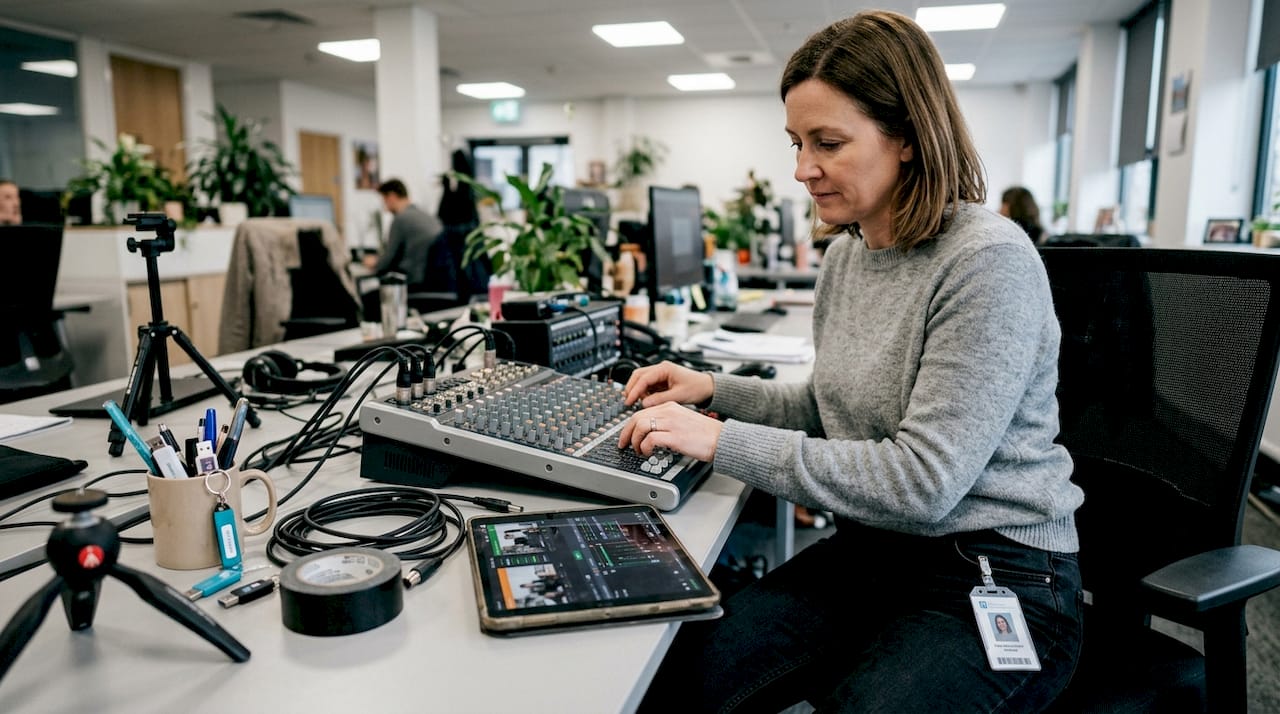
The DIY versus hire decision comes down to stakes and scale. For a small internal town hall, a capable in-house team with the right gear can manage. For a multi-session conference, product launch, or investor event, working with professional live-stream partners eliminates technical risk and elevates production value significantly. Vet any production partner on their redundancy protocols, crew experience with live events, and their process for managing technical failures mid-stream.
Master pre-event planning and rehearsals
With technology in place, your next priority is planning and rehearsing every show detail. Thorough rehearsals and contingency plans reduce livestream failure risk, and this is where disciplined planners separate themselves from reactive ones.
Follow this sequence to build a bulletproof pre-event process:
- Create a run-of-show document — a minute-by-minute timeline covering every segment, speaker transition, video playback, and technical cue
- Build a shot list — define camera angles, graphics overlays, and lower-third titles (the text identifiers that appear on screen) for each segment
- Complete a full technology checklist — confirm encoder settings, platform stream keys, backup internet connections, and audio levels at least 48 hours before the event
- Run a technical rehearsal — test every piece of equipment in the actual event environment, not just in a conference room
- Conduct a full dress rehearsal — walk through the entire program with speakers, moderators, and production crew as if it were live
- Activate contingency protocols — assign a dedicated technical point of contact, have a backup encoder ready, and prepare a holding slide in case of interruption
Speaker preparation is often underestimated. Many executives are comfortable on stage but freeze when speaking to a camera with no visible audience. Brief them on eye contact with the lens, pacing for remote viewers, and how to handle technical pauses gracefully.
Explore live streaming video tools that support smoother rehearsal workflows and real-time monitoring during the event itself.
Pro Tip: Always assign a dedicated “stream monitor” whose only job during the event is watching the viewer-facing output on a separate device. They catch audio drops, encoding glitches, or graphic errors before they become audience complaints.
Engage your audience in real time
Meticulous preparation enables you to truly connect with your audience when the cameras go live. Real-time audience interaction significantly boosts engagement and retention, and the data consistently backs this up. Events with interactive elements see viewer retention rates climb well above passive broadcast formats.
Here are six proven ways to drive participation during your corporate livestream:
- Live polling — ask viewers to vote on a relevant question every 20 to 30 minutes to reset attention and surface audience sentiment
- Moderated Q&A — collect questions through the platform’s chat or a dedicated tool like Slido, then have a moderator surface the best ones to speakers
- Social wall integration — display curated social media posts using your event hashtag on a live feed visible to both in-room and virtual audiences
- Audience shoutouts — acknowledge specific viewer comments or locations to create a sense of community across the virtual room
- Breakout challenges — pose a problem or scenario and invite viewers to submit responses, then share highlights during a recap segment
- Live resource drops — release downloadable assets, discount codes, or exclusive content at specific moments to reward viewers who stay through the full event
“The events that generate the most post-event buzz are the ones where virtual attendees felt like participants, not spectators.”
Host presentation quality matters enormously. A strong livestream host maintains energy, speaks directly to the camera, and bridges the gap between in-room energy and the remote experience. Pacing is critical. Build in natural pauses, recap key points for viewers who may have joined late, and avoid dense information blocks that work in person but lose remote audiences quickly.
For deeper strategy, review livestream event benefits and the broader case for corporate livestreaming benefits as part of your planning rationale.
Measure performance and improve future livestreams
After a successful livestream, the final step is learning from your results to make the next one even better. Evaluating livestream data is critical for refining future event strategies, and the planners who do this consistently outperform those who treat each event as a standalone effort.
Here are the core metrics to review after every event:
| Metric | What it reveals |
|---|---|
| Total unique viewers | Overall reach and audience size |
| Average watch time | Content relevance and pacing quality |
| Peak concurrent viewers | Strongest content moments |
| Audience drop-off points | Segments that lost attention |
| Engagement rate | Percentage of viewers who interacted |
| Conversion rate | Registrants who completed a desired action |
Follow this four-step process to turn data into improvement:
- Pull your platform analytics within 24 hours while context is fresh, and export raw data for your records
- Map drop-off points to content segments to identify which speakers, topics, or formats caused viewers to leave
- Send a post-event survey within 48 hours asking attendees to rate content quality, technical experience, and overall value
- Document findings in a structured debrief and share them with your production team and stakeholders before planning the next event
For events with a content replay strategy, also track replay views and replay completion rates. These numbers often reveal a secondary audience that missed the live event but found value in the recording. See post-event video enhancements for ways to extend the life of your livestream content well beyond the broadcast date.
Review your full event streaming analytics framework to build a repeatable measurement system across your event calendar.
What most event planners miss about livestreaming success
Here is the insight we share with clients after two decades of producing corporate events: most planners treat a livestream as a technical deliverable rather than a brand experience. They invest heavily in the broadcast itself and almost nothing in what happens after. The stream ends, the replay link goes out, and the audience is left with no next step.
The events that generate lasting ROI are the ones built around a community loop. The livestream is the spark, not the finish line. Post-event content, follow-up conversations, and replay-driven nurture sequences are where the real value compounds. We have seen brands generate more qualified leads from a 30-day post-event content strategy than from the event registration itself.
The impact of live event streaming goes far beyond the broadcast window when you treat it as an ongoing engagement asset. Every livestream your organization produces should feed a bigger content ecosystem, not just fill a calendar slot.
Partner with livestreaming experts for flawless events
Applying these best practices requires the right team behind the camera as much as the right strategy on paper. Bonomotion has been producing corporate livestreams and high-stakes event video since 2003, working with startups, growing brands, and Fortune 100 companies across industries.
Our producers work directly with your team from objective-setting through post-event analytics, functioning as a true extension of your organization. Whether you need corporate live streaming services for a single keynote or a full suite of corporate video solutions for an annual conference, we bring the technical precision and creative direction your event deserves. Connect with our team at Miami corporate video production to start planning your next event.
Frequently asked questions
What is the minimum equipment needed for professional event livestreaming?
At minimum, you’ll need a high-quality camera, microphone, dedicated encoder, and a stable wired internet connection for professional livestreaming. Professional livestreams require quality cameras, audio, and streaming hardware to deliver a broadcast-grade viewer experience.
How can I increase viewer engagement during my corporate livestream?
Use interactive tools like live polls, audience Q&A sessions, and social wall integrations to keep your viewers engaged throughout the event. Interactive elements such as polls and Q&A sessions are proven to increase both engagement rates and overall viewer retention.
What post-event data should I analyze?
Review key metrics such as total viewers, average watch time, engagement actions, and audience drop-off points to measure event success. Essential post-event metrics include watch time, engagement rate, and drop-off points, which together reveal both content quality and technical performance.
When should I hire a professional livestream production team?
Hire professionals for high-stakes events or when in-house resources can’t deliver the needed technical quality and reliability. Professional streaming partners ensure reliability and production quality for events where failure is not an option.