

A storyboard is a visual blueprint that sequences scenes, camera angles, and messaging to map your brand video before a single frame is filmed. Known formally as a production storyboard, this tool is the difference between a shoot that runs on schedule and one that burns budget on reshoots. Marketing professionals and business owners who master how to storyboard brand videos gain a direct advantage: clearer messaging, faster stakeholder approvals, and a production team that knows exactly what to capture. This guide covers every step, from the tools you need to the multi-channel adaptations that protect your brand across platforms.
What do you need before storyboarding your brand video?
Preparation determines whether your storyboard guides production or creates confusion. Three things must be in place before you sketch a single frame.
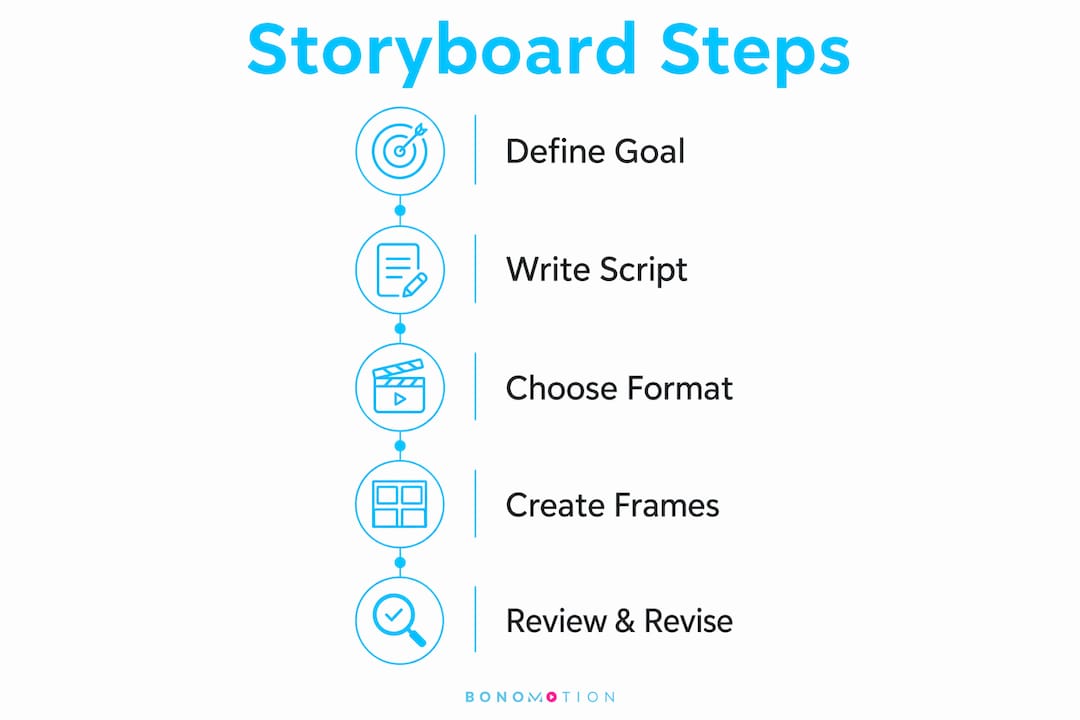
Define your video goal and audience. A product launch video for C-suite executives requires a different visual language than a social media campaign targeting first-time buyers. Write your goal in one sentence: “This video will convince mid-market CFOs to request a demo.” That sentence becomes your filter for every creative decision.

Write a tight script first. Your storyboard is only as strong as the script beneath it. Tools like Grammarly catch copy errors before they become on-screen problems, while a structured script format keeps dialogue, voiceover, and on-screen text clearly separated. Brand video scriptwriting tips consistently point to the same principle: clarity on paper produces clarity on screen.
Choose your storyboarding format. Traditional hand-drawn sketches work for small teams with fast timelines. Digital tools give distributed teams a shared workspace. AI-assisted platforms generate visual concepts from script prompts, saving production time without replacing the marketer’s judgment on brand messaging. The table below compares three widely used tools.
| Tool | Best for | Key strength | Limitation |
|---|---|---|---|
| Boords | Agency teams | Collaboration and animatic export | Paid tiers required for full features |
| Milanote | Solo marketers | Visual mood board integration | Less suited to large team workflows |
| Canva | Quick drafts | Template library and ease of use | Limited annotation depth |
Involve stakeholders before you finalize the format. A CMO who sees the storyboard for the first time at the approval stage will ask for changes that cost days. Early input from decision-makers compresses the revision cycle significantly.
How do you create a detailed storyboard for your brand video?
A detailed storyboard maps camera angles, character movements, transitions, and timing to guide every member of the production team. Follow these steps to build one that holds up from pre-production through final edit.
-
Break your script into scenes and shots. Read through your script and mark every location change, subject change, or emotional shift as a new scene. Then divide each scene into individual shots. A 90-second brand video typically produces 15–30 individual shot frames.
-
Sketch or source a thumbnail for each shot. You do not need to be an illustrator. Stick figures, rough shapes, and directional arrows communicate framing clearly. If your team uses Boords or Milanote, drag in reference images or AI-generated visuals as placeholders.
-
Annotate every frame with camera and audio details. Write the camera angle (wide shot, close-up, over-the-shoulder), any camera movement (pan left, push in), the dialogue or voiceover line, and any sound effects or music cues. Descriptive annotations bridge the gap for non-creative stakeholders who cannot visualize raw sketches, making executive approvals faster and more confident.
-
Add transitions and text overlays. Note whether each cut is a hard cut, a dissolve, or a wipe. Mark where lower-third text, logo bugs, or branded titles appear on screen. These details prevent the editor from guessing and protect brand consistency in post-production.
-
Assign timing to each shot. Write the intended duration next to each frame. If your total adds up to 110 seconds and your target is 90 seconds, you know where to cut before the camera rolls. This step is where narrative discipline pays off: mapping the hook, problem, solution, and call to action forces you to cut weak scenes early.
-
Circulate for structured feedback. Share the storyboard with your producer, creative director, and at least one non-creative stakeholder. Collect feedback in one consolidated round, not in scattered email threads.
-
Finalize and lock the approved version. Mark the document as “approved” with a version number and date. This becomes the production reference that everyone on set uses.
Pro Tip: Keep a “change log” tab in your storyboard document. When on-set opportunities arise, log the proposed change, note who approved it, and confirm it still serves the brand objective before the camera moves.
What storyboard mistakes should you avoid for brand consistency?
The most common storyboard failures share one trait: they create ambiguity that costs money later. Professional agencies mandate storyboard approval specifically to reduce costly reshoots and miscommunication. Here are the mistakes that most often trigger those reshoots.
-
Creative rigidity. A storyboard that cannot flex when a location falls through or a better shot presents itself becomes a liability. Storyboards should remain living documents that adapt when better creative opportunities arise, provided stakeholders agree to the change.
-
Insufficient annotations. Sketches alone do not communicate audio, pacing, or emotional tone. Non-creative executives cannot approve what they cannot visualize. Every frame needs written context.
-
Ignoring multi-aspect ratio requirements. A storyboard built only for a 16:9 website video will fail when the social media team needs a 9:16 vertical cut. Design for all intended formats from the start.
-
Skipping structured review rounds. Informal feedback loops produce conflicting notes and missed sign-offs. Build one formal review round into your timeline with a clear deadline and a named approver.
-
Locking brand messaging too late. If your core message changes after production begins, every shot tied to the old message becomes unusable. Confirm the message before the storyboard is approved.
Pro Tip: When presenting storyboards to executives or marketing leads, pair each frame with a one-sentence “viewer experience” note. Write what the audience will feel or understand at that moment, not just what they will see. This language lands with non-creative decision-makers far more effectively than visual descriptions alone.
The video pre-production phase is where these mistakes are cheapest to fix. Every gap you close in the storyboard is a reshoot you avoid on set.
How do you adapt storyboards for multi-channel video distribution?
Multi-channel distribution requires storyboard decisions made before production, not after. Key visual elements must stay center-safe to allow cropping into 16:9, 1:1, and 9:16 formats without losing critical content. A logo placed in the bottom-left corner of a widescreen frame disappears entirely in a square crop.
The table below shows how storyboard notes differ by platform.
| Platform | Aspect ratio | CTA placement | Key storyboard note |
|---|---|---|---|
| Website / YouTube | 16:9 | End card, last 5 seconds | Full visual range available; use wide establishing shots |
| Instagram / Facebook feed | 1:1 | On-screen text, mid-video | Center all key subjects; avoid edge-heavy compositions |
| Instagram Reels / TikTok | 9:16 | Bottom-third overlay | Text and faces must stay within center 80% of frame |
| 16:9 or 1:1 | End card or caption link | Professional tone; avoid fast cuts under 1 second |
Annotate your storyboard frames with the intended platform for each shot. When a single shoot must serve four platforms, mark which frames will be repurposed and flag any compositions that will not survive the crop. Your editing team will thank you, and your brand messaging will stay intact across every channel. Visual storytelling techniques that work on a website often need reframing for vertical mobile formats, and the storyboard is the right place to plan that reframing.
For brands running video production for marketing agencies, building multi-ratio storyboard templates into your standard workflow eliminates the last-minute scramble when a client requests a social cut after the shoot wraps.
Key Takeaways
A production storyboard is the single most effective tool for aligning brand messaging, controlling production costs, and gaining stakeholder approval before filming begins.
| Point | Details |
|---|---|
| Define goals before sketching | Write your video objective in one sentence and use it to filter every creative decision. |
| Annotate every frame fully | Include camera angle, movement, audio cues, and timing so non-creative stakeholders can approve with confidence. |
| Build for multiple aspect ratios | Keep key subjects center-safe from the start to protect brand messaging across 16:9, 1:1, and 9:16 formats. |
| Treat the storyboard as a living document | Log on-set changes with stakeholder approval to stay flexible without losing brand focus. |
| Run one structured review round | Consolidate feedback in a single formal round with a named approver to prevent revision loops. |
Why I think most brand teams underestimate the storyboard
After working on brand video productions across industries, the pattern is consistent: teams that treat the storyboard as a formality pay for it in post-production. The storyboard is not a creative exercise. It is a risk management document that happens to look visual.
The most valuable thing a storyboard does is force a conversation that most teams avoid: does this scene actually serve the brand message, or does it just look good? Narrative structure mapped during storyboarding produces stronger, clearer video content precisely because it forces that question at the cheapest possible moment.
Non-creative stakeholders are often the biggest bottleneck in approval workflows. The fix is not simpler visuals. It is richer annotations. When a CFO reads “viewer feels confident in the product’s reliability” next to a close-up of a quality inspection, they approve faster than when they stare at a sketch and guess at the intent.
The brands that get the most from their video budgets treat the storyboard as a living document, not a locked artifact. They build in a change log, they design for every platform from frame one, and they involve their producers early. That discipline is what separates a brand video that performs from one that simply exists.
— Bernard
Bonomotion’s approach to storyboard-driven video production
Every brand video Bonomotion produces begins with a structured storyboard process guided by an experienced producer who works directly with your team.
From the first briefing session through final delivery, Bonomotion’s producers align your messaging, audience, and platform requirements into a storyboard that the entire production team can execute with precision. Whether you need corporate video production in Hollywood or a multi-platform branded campaign, the storyboard review and iteration process is built into every project workflow. That means fewer surprises on set, fewer revision rounds in post, and a final product that reflects your brand exactly as intended. Reach out to Bonomotion to start your next video project with a production storyboard that works.
FAQ
What is a storyboard in brand video production?
A storyboard is a visual blueprint that sequences scenes, camera angles, transitions, and timing to plan a brand video before filming begins. It aligns the production team and stakeholders around a shared creative vision.
How many frames does a typical brand video storyboard need?
A 90-second brand video typically produces 15–30 individual storyboard frames, depending on the number of scenes and shot variations required.
What tools are best for creating video storyboards?
Boords, Milanote, and Canva are three widely used storyboarding tools, each suited to different team sizes and workflow needs. AI-assisted platforms can also generate visual concepts from script prompts to speed up the drafting process.
How do you storyboard for multiple social media platforms?
Design all key visual elements to be center-safe so they survive cropping into 16:9, 1:1, and 9:16 formats. Annotate each frame with its intended platform and flag any compositions that will not transfer cleanly to vertical formats.
Why do professional video agencies require storyboard approval?
Professional agencies mandate storyboard approval to reduce costly reshoots and miscommunication on set. Catching narrative gaps and branding misalignments at the storyboard stage costs a fraction of fixing them during or after production.