

Pressing “go live” and calling it a production is one of the most common mistakes we see corporate teams make when planning a major event. Professional livestream production is a layered, strategic workflow that combines careful pre-event planning, real-time scene management, multi-platform distribution, and post-show content repurposing into a single cohesive system. When your brand is presenting to shareholders, launching a product, or hosting a multi-day conference, the difference between a raw broadcast and a polished production is visible to every viewer tuning in. This guide breaks down exactly what that process looks like and why it matters for your organization.
Table of Contents
- What is livestream production?
- Core components: The production stack
- Simulcasting and multi-platform distribution
- Integrating livestreams into your content strategy
- Why pro livestreams outperform simple broadcasts
- Ready to elevate your next corporate event?
- Frequently asked questions
Key Takeaways
| Point | Details |
|---|---|
| Production stack essentials | Effective livestream production includes strategic planning, scene switching, and content clipping. |
| Simulcasting advantage | Streaming to multiple platforms at once amplifies audience reach and brand impact. |
| Content repurposing | Marking key moments and repurposing highlights increases engagement after the event. |
| Professional workflows win | Experienced production teams deliver better quality, adaptability, and results for corporate events. |
What is livestream production?
At its most basic level, streaming means sending video from a camera to an internet destination. That’s it. A smartphone on a tripod can do that. But business livestream production is something fundamentally different. It’s the full ecosystem of decisions, tools, and workflows that transform a live event into a broadcast-quality experience your audience actually engages with.
Think about the difference between a raw news feed and a polished cable news broadcast. Both are live. But one has lower-thirds graphics, multiple camera angles, smooth transitions, a teleprompter-ready anchor, and a production director calling shots in an earpiece. The other is just video. Corporate events deserve that same level of intentional production.
Professional livestream production encompasses three strategic layers that work together:
- Pre-production planning: Run-of-show documents, speaker briefings, sponsor branding integration, and technical rehearsals that establish every decision before the camera ever rolls
- Live switching and scene management: The real-time operation of transitions, graphics, lower-thirds, and camera cuts during the event itself
- Content clipping and highlights workflows: The systematic capture of key moments for post-show distribution, social media, and on-demand replay
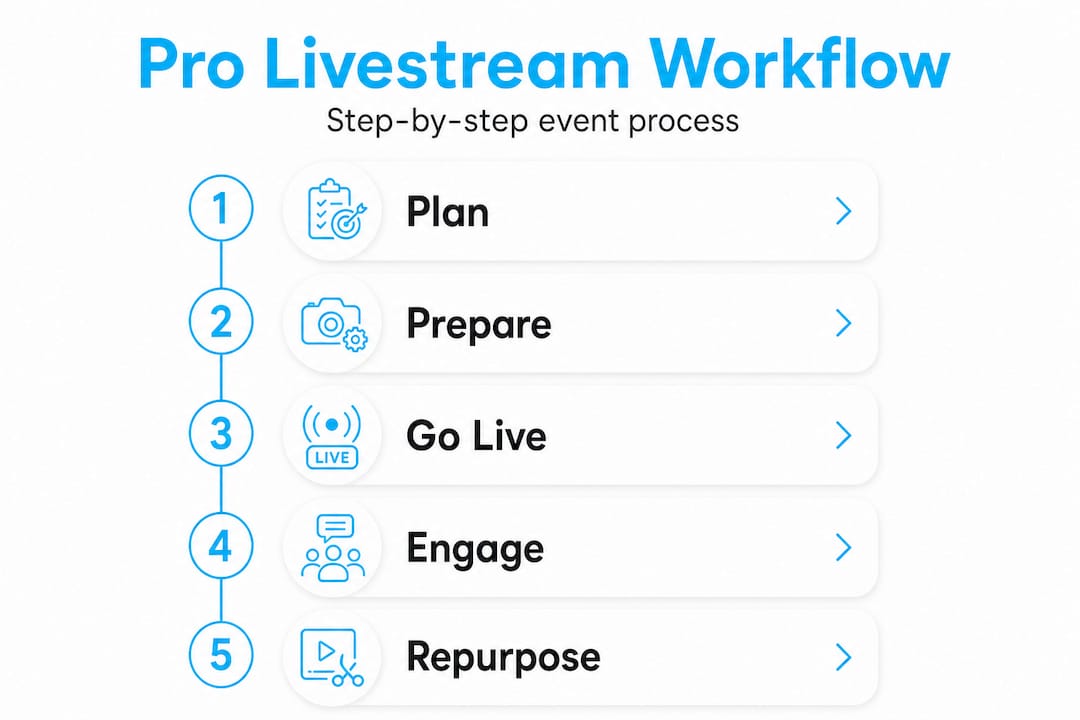
As the methodology around modern production has evolved, the repeatable production stack has become the standard framework: a run-of-show and planning phase, a switching layer built around scenes and hotkeys, and a clipping workflow that can be managed manually or automated through software.
“Professional livestream production isn’t about the technology you use. It’s about the workflow you build around it.”
Without a defined workflow, even the best equipment delivers inconsistent results. With a repeatable system in place, your team can troubleshoot in real time, maintain brand consistency, and deliver a reliable viewer experience from the first session to the last.
Core components: The production stack

With the main concepts defined, let’s see how these components work together in a practical production stack for a corporate event.
The production stack is not a single piece of software. It’s a layered architecture where each component handles a specific function, and each one depends on the one before it working correctly. Here’s how a typical corporate event stack is structured:
-
Build the run-of-show document. This is your production bible. It lists every segment of the event by time, names each speaker, includes their title and organization for lower-thirds, notes any sponsor logos or video roll-ins, and specifies when each scene should be active. The more detailed this document, the fewer decisions your operator needs to make under pressure.
-
Configure your switching layer. Software tools like OBS Studio, vMix, and StreamYard each allow you to pre-build scenes (collections of camera feeds, graphics, and audio sources) and assign hotkeys for instant transitions. The switching layer is where your brand identity lives in real time.
-
Set up your clipping and highlights workflow. This can be as simple as a team member flagging timestamps during the event or as sophisticated as automated clip software that detects applause, laughter, or speaker changes. Either way, the workflow must be planned before the event starts, not improvised afterward.
-
Conduct a full technical rehearsal. Run every scene, test every transition, verify every audio source, and confirm your stream is reaching its destinations at the correct bitrate and resolution.
-
Execute with a clear communication structure. During the event, a director calls the shots while operators handle switching, graphics, and monitoring. This division of responsibility is what separates a professional production from a one-person scramble.
Comparison of common switching tools for corporate events:
| Tool | Best for | Key feature | Learning curve |
|---|---|---|---|
| OBS Studio | Budget-conscious productions | Open-source, highly customizable | Moderate |
| vMix | High-end multi-camera events | NDI support, built-in replay | Steep |
| StreamYard | Remote/hybrid presentations | Browser-based, guest management | Low |
| Ecamm Live | Mac-focused event teams | Clean UI, screen sharing | Low to moderate |
Setting up this professional livestream workflow before your event is the single highest-ROI action you can take for production quality. And event livestream planning that incorporates all three stack layers consistently outperforms ad hoc approaches on every measurable metric from viewer retention to post-event clip performance.
Pro Tip: Create a scene for every possible situation, not just the expected ones. Build a “technical difficulty” holding slate, a “break” screen with music and a countdown timer, and a “thank you” end card. When something unexpected happens, having a polished fallback scene ready prevents what would otherwise be a jarring on-screen gap.
Simulcasting and multi-platform distribution
Beyond the production stack, distribution methods such as simulcasting amplify your event’s reach in ways that a single-destination stream simply cannot match.
Simulcasting is the practice of broadcasting your event to multiple platforms simultaneously from a single encoded stream. The technical workflow works like this: your encoder (OBS, vMix, or a dedicated hardware encoder) sends one high-quality stream to a distribution service or a multistreaming platform, which then duplicates and routes that stream to each destination. Simulcasting sends the same encoded stream to multiple destinations from a single ingest point, reducing the computational load and eliminating the need to run separate encoders for each platform.
For a corporate event, this means your keynote speaker can be broadcast to LinkedIn, YouTube, and a private corporate intranet simultaneously. Your LinkedIn audience sees the event in their professional feed. Your YouTube audience can discover it through search or subscriptions. Your employees on the intranet see it without needing a public social media account.
Single-stream vs. simulcast comparison:
| Approach | Platforms reached | Technical complexity | Audience reach | Post-event discoverability |
|---|---|---|---|---|
| Single-stream | 1 | Low | Limited | One platform only |
| Simulcast | 3 to 6+ | Moderate (with tools) | Significantly expanded | Multi-platform search indexing |
The benefits for event simulcasting extend well beyond the live broadcast window. Each platform retains the replay, which means your event continues generating views, shares, and engagement for weeks afterward. An effective corporate event livestream strategy always accounts for what happens after the stream ends, not just during it.
Key advantages of simulcasting for corporate events include:
- Audience segmentation: Different stakeholders live on different platforms. Simulcasting meets them where they already are rather than asking them to migrate to a single destination.
- Risk mitigation: If one platform experiences an outage during your event, viewers on other platforms remain unaffected.
- Brand presence amplification: Simultaneous appearance across multiple platforms creates a perception of scale and authority that a single-platform stream cannot replicate.
- SEO and discoverability: Replays indexed on YouTube and LinkedIn extend the long-tail value of your event content far beyond the live audience.
The complete guide to live event streaming covers platform-specific technical requirements in more detail, but the core principle is straightforward: reach more people without proportionally increasing your production overhead.
Integrating livestreams into your content strategy
Strategic distribution sets the stage for content repurposing. Now let’s explore how livestreams fit into a broader marketing content strategy rather than functioning as isolated broadcasts.
The most effective production teams we work with treat every live event as a content manufacturing opportunity. They don’t just stream the event. They design it from the beginning to produce assets that serve their marketing calendar for weeks or months afterward. Live events designed as part of a broader content pipeline perform significantly better when teams plan for clip markers and post-show outputs like highlights and replays before production begins.
Here’s what that looks like in practice:
- Pre-mark the run-of-show for clip potential. Before the event, identify which segments are likely to generate shareable clips. Opening remarks, keynote moments, Q&A highlights, and product reveals all translate well to short-form content. Mark these moments in your run-of-show document so your team knows to flag them during production.
- Use chapter markers or timestamp logging during the event. Whether automated or manual, capturing timestamps in real time dramatically speeds up post-production editing and allows you to deliver social clips within hours of the event ending rather than days.
- Build a post-show output plan before the event. Know in advance which formats you need. A 90-second highlights reel for LinkedIn, a 15-minute condensed replay for your email list, and a full-length replay on YouTube all serve different audience segments and require different editing approaches.
- Treat the replay as a product, not a byproduct. On-demand content from live events often outperforms the original broadcast in total view count. Optimizing the replay with chapters, a thumbnail, and a description written for search visibility extends the value of your production investment significantly.
Your corporate livestream workflow should account for this content pipeline from day one of planning, not as an afterthought once the event is over. The live streaming best practices that consistently deliver the strongest ROI all share this common trait: they treat the live broadcast as the beginning of a content cycle, not the end of one.
Pro Tip: Assign a dedicated “clip logger” role during your event. This person’s only job is to note timestamps and short descriptions of shareable moments as they happen. Even a simple shared spreadsheet updated in real time will reduce your post-production turnaround from days to hours and help you publish while the event is still top of mind.
Why pro livestreams outperform simple broadcasts
We’ve been producing corporate live events for over two decades, and one pattern appears repeatedly: organizations that underinvest in production infrastructure consistently underperform on the metrics they care about most, specifically viewer retention, lead generation from event content, and post-show brand recall.
The argument we hear most often is that “any live stream is better than nothing.” It sounds reasonable until you consider what a poor production actually signals to your audience. A dropped frame, a blown-out speaker audio feed, a lower-third that displays the wrong job title, or a stream that buffers during your CEO’s key announcement doesn’t just create a bad moment. It creates a negative brand association that your content team will spend real budget trying to repair.
The stack approach changes this dynamic entirely. When every component of your production has a defined purpose and a fallback plan, you can adapt in real time without visible disruption to the viewer. A camera feed goes down? The operator cuts to a wide shot and the audience never knows. A speaker runs long? The director flags the segment, adjusts the timeline, and the graphics operator updates the lower-thirds accordingly. This kind of responsive, professional execution is what separates a polished event from an amateur one.
There’s also the downstream value to consider. When your production is built around a content pipeline, the business impact of live event streaming extends far beyond the 90 minutes of the event itself. A well-produced keynote becomes a case study video, a series of executive thought-leadership clips, an internal training resource, and an evergreen piece of content on your website. None of that happens efficiently from a raw, unmanaged broadcast.
The honest take is this: simple broadcasting is a transactional tool. Professional livestream production is a strategic one. If your events are meant to drive business outcomes, the investment in structured production workflows pays for itself many times over in the quality and quantity of content you can deploy afterward.
Ready to elevate your next corporate event?
For teams ready to drive engagement and brand impact, professional production support makes the difference between a broadcast that fades and one that builds lasting brand equity.
At Bonomotion, our corporate video production expertise spans more than two decades of high-stakes events, executive presentations, product launches, and multi-day conferences. We operate as a true extension of your team, bringing a structured production stack, experienced directors, and a content repurposing mindset to every event we produce. Whether you need live streaming services for corporate events for a single keynote or a complex multi-day simulcast across six platforms, we build the workflow around your specific objectives and audience. Explore our event streaming guide to see the full scope of what professional production can deliver for your brand.
Frequently asked questions
How does livestream production differ from basic streaming?
Livestream production includes a full production stack mindset with strategic planning, a real-time switching layer, and a clipping and highlights workflow, while basic streaming is simply broadcasting a raw video feed without any of those structured layers.
What is simulcasting in livestream production?
Simulcasting sends the same encoded stream to multiple platform destinations from a single ingest point, allowing corporate events to reach LinkedIn, YouTube, and other channels simultaneously without running separate encoders for each one.
How can corporate teams repurpose livestream content?
Teams mark key moments during the event using timestamps or clip logging, then edit those flagged segments into highlights, condensed replays, and social clips after the broadcast. Planning this content pipeline before the event dramatically speeds up post-show turnaround and maximizes engagement.
Does professional livestream production improve audience engagement?
Yes. Strategic workflows, polished scene management, and multi-platform simulcast distribution all contribute to higher viewer retention during the broadcast and stronger content performance in the days and weeks that follow.